Your Supabase anon key is already public. That's the trap.
Open any Supabase app in your browser. Right-click, View Source, search for supabase.co. You'll find two strings: your project URL and your anon key. They're supposed to be there — the frontend needs them to talk to the database.
Now open a terminal on any machine in the world and run this:
curl "https://YOUR_PROJECT.supabase.co/rest/v1/users?select=*" \
  -H "apikey: YOUR_ANON_KEY" \
  -H "Authorization: Bearer YOUR_ANON_KEY"
If that returns a JSON array of every user in your database — emails, hashed passwords, Stripe customer IDs, whatever columns you added — congratulations, you just dumped your own production data with a single HTTP request. No login. No exploit. No CVE. Just the default.
That's the trap. The app works. Users log in, see their dashboards, pay for things. Everything feels solid. But the frontend is a polite fiction — the WHERE user_id = me filters live in JavaScript, and JavaScript is readable by the person you're trying to keep out.
This is the single most common vulnerability we see in apps built with Lovable, Bolt, Cursor, and v0. The fix takes 15 minutes. Here's what's actually happening, what AI tools generate instead, and exactly how to lock it down.
How RLS works
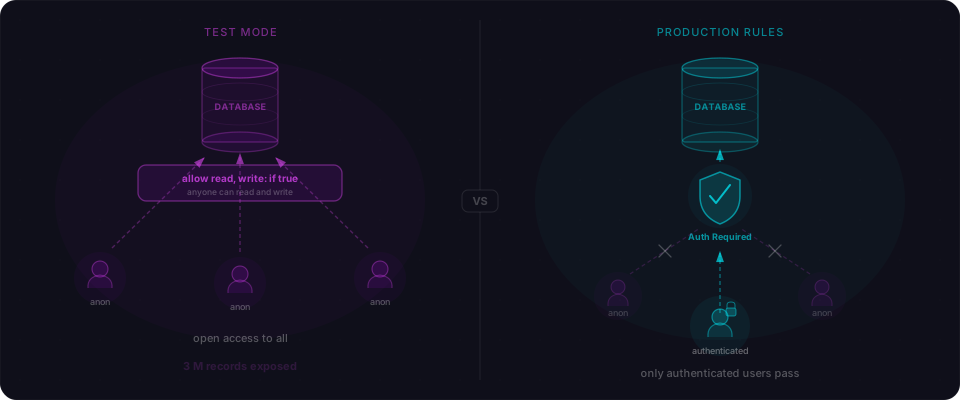
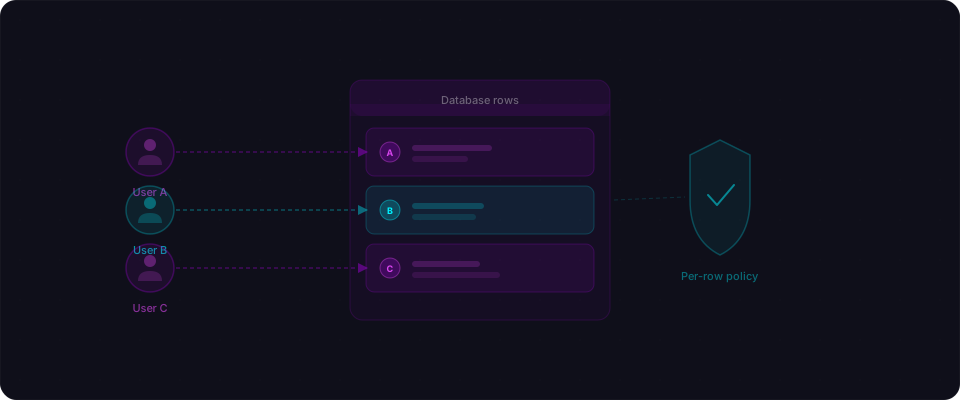
Row Level Security is a PostgreSQL feature. Supabase exposes it as a first-class concept: you write SQL policies that attach to tables, and every query — whether it comes from the client, a server action, or a raw REST call — has those policies applied automatically.
Without RLS:
- Anon key (public, shipped in your JavaScript bundle): full read/write on every table
- Service role key (secret, server-side only): full access, bypasses everything
With RLS enabled:
- Anon key: scoped by your policies — typically "users see only their own rows"
- Service role key: still full access (for admin jobs, server actions, webhooks)
The shift: the anon key stops being a master key and becomes a scoped key. That's what makes it safe to ship in client-side code.
What AI tools actually generate
Ask Lovable, Bolt, or Cursor to "build me a task manager with Supabase" and you'll get a migration that looks roughly like this:
create table tasks (
  id uuid primary key default gen_random_uuid(),
  user_id uuid references auth.users(id),
  title text not null,
  completed boolean default false,
  created_at timestamptz default now()
);
Notice what's missing. There's no alter table tasks enable row level security. There's no create policy. The user_id column is there — the AI knew tasks belong to users — but nothing enforces it. The frontend code then does this:
const { data } = await supabase
  .from("tasks")
  .select("*")
  .eq("user_id", user.id);
The .eq("user_id", user.id) filter is a client-side suggestion. An attacker doesn't even need DevTools — they can skip your frontend entirely and hit the PostgREST endpoint with a single curl:
curl "https://YOUR_PROJECT.supabase.co/rest/v1/tasks?select=*" \
  -H "apikey: YOUR_ANON_KEY"
No filter. No auth. Every task for every user. The database cheerfully hands it over because nothing at the database level says otherwise.
The fix is two lines of SQL:
alter table tasks enable row level security;

create policy "users see own tasks"
  on tasks for select
  using (auth.uid() = user_id);
Now the .eq() filter is irrelevant. PostgreSQL rewrites every query to include where user_id = auth.uid() before it touches a row. The client can't opt out.
Why do AI tools skip RLS?
Across the apps we've scanned — built with Lovable, Bolt, Cursor, and Claude — the pattern is consistent: AI generates working schemas, wires up auth, and ships. Policies get skipped almost every time.
Four reasons:
1. AI optimizes for "working," not "safe." When you say "build me a task manager," the model focuses on the happy path — create, read, update, delete. Access control isn't in the functional spec, so it doesn't appear in the output.
2. Policies need a data model the AI doesn't have. Good policies encode ownership and sharing rules: who owns what, what's public, what's shared across an org. That context lives in your head, not the prompt.
3. Broken RLS is invisible. This is the real trap. The app functions perfectly. You log in, you see your data. The only way to notice the bug is to try to attack yourself — and nobody does that during a vibe-coding session.
4. Supabase defaults don't save you. New tables ship with RLS disabled. There's no deploy warning, no dashboard banner, no lint rule. The happy path skips security entirely.
Combine all four and you get the single most common vulnerability in vibe-coded applications: RLS off, policies missing, anon key in the bundle, database wide open.
How do you check if your database is exposed?
Run this query in your Supabase SQL Editor right now:
SELECT schemaname, tablename, rowsecurity
FROM pg_tables
WHERE schemaname = 'public';
If any row shows rowsecurity | false, that table is accessible to anyone with your anon key. Fix it before you do anything else.
To see what policies exist on tables that do have RLS enabled:
SELECT tablename, policyname, permissive, roles, cmd, qual
FROM pg_policies
WHERE schemaname = 'public';
If a table has RLS enabled but no policies, it defaults to denying all access (which is safe but breaks your app). You need both: RLS enabled AND appropriate policies.
Setting up RLS from scratch
Let's walk through securing a typical app — say a simple task manager with users and tasks.
Step 1: Enable RLS on every table
ALTER TABLE users ENABLE ROW LEVEL SECURITY;
ALTER TABLE tasks ENABLE ROW LEVEL SECURITY;
ALTER TABLE categories ENABLE ROW LEVEL SECURITY;
Do this for every table in your public schema. No exceptions.
Step 2: Create policies for user-owned data
The most common pattern: users can only access their own rows.
-- Users can read their own profile
CREATE POLICY "Users can view own profile"
ON users FOR SELECT
USING (auth.uid() = id);

-- Users can update their own profile
CREATE POLICY "Users can update own profile"
ON users FOR UPDATE
USING (auth.uid() = id);

-- Users can read their own tasks
CREATE POLICY "Users can view own tasks"
ON tasks FOR SELECT
USING (auth.uid() = user_id);

-- Users can create tasks (assigned to themselves)
CREATE POLICY "Users can create own tasks"
ON tasks FOR INSERT
WITH CHECK (auth.uid() = user_id);

-- Users can update their own tasks
CREATE POLICY "Users can update own tasks"
ON tasks FOR UPDATE
USING (auth.uid() = user_id);

-- Users can delete their own tasks
CREATE POLICY "Users can delete own tasks"
ON tasks FOR DELETE
USING (auth.uid() = user_id);
Step 3: Handle shared data
Some data should be readable by multiple users. For example, categories might be shared across an organization:
-- Categories are readable by all authenticated users
CREATE POLICY "Authenticated users can view categories"
ON categories FOR SELECT
TO authenticated
USING (true);

-- Only admins can create categories
CREATE POLICY "Admins can manage categories"
ON categories FOR ALL
USING (
  EXISTS (
    SELECT 1 FROM users
    WHERE users.id = auth.uid()
    AND users.role = 'admin'
  )
);
Step 4: Handle public data
If some data should be visible without authentication (like a public profile or published content):
-- Published posts are readable by anyone
CREATE POLICY "Anyone can view published posts"
ON posts FOR SELECT
USING (published = true);

-- Authors can view all their own posts (including drafts)
CREATE POLICY "Authors can view own posts"
ON posts FOR SELECT
USING (auth.uid() = author_id);
Step 5: Verify it works
Test from an unauthenticated context:
# This should return empty or error — not your data
curl "https://YOUR_PROJECT.supabase.co/rest/v1/tasks?select=*" \
  -H "apikey: YOUR_ANON_KEY" \
  -H "Authorization: Bearer YOUR_ANON_KEY"
Then test as an authenticated user to confirm they see only their own rows:
const { data } = await supabase.from("tasks").select("*");
// Should return only the current user's tasks, not everyone's
Common RLS patterns
Here are the patterns you'll use most often:
Owner-based access
-- Simple: user owns the row
USING (auth.uid() = user_id)

-- With a foreign key: user owns the parent
USING (
  auth.uid() = (
    SELECT user_id FROM projects
    WHERE projects.id = project_id
  )
)
Role-based access
-- Check user's role from a profiles table
USING (
  EXISTS (
    SELECT 1 FROM profiles
    WHERE profiles.id = auth.uid()
    AND profiles.role IN ('admin', 'editor')
  )
)
Organization / team access
-- User belongs to the same org as the resource
USING (
  org_id IN (
    SELECT org_id FROM org_members
    WHERE user_id = auth.uid()
  )
)
Time-based access
-- Content is accessible after publish date
USING (published_at <= now())
The mistakes people make
Even when RLS is enabled, there are common mistakes:
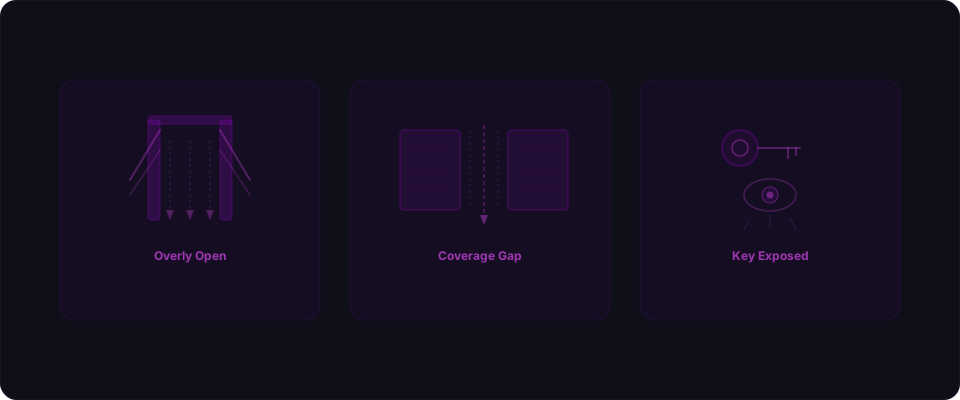
Mistake 1: Using the service role key in client code
The service role key bypasses all RLS policies. If it's in your JavaScript bundle, RLS is effectively disabled.
// NEVER do this in client code
const supabase = createClient(url, SERVICE_ROLE_KEY);
// This bypasses RLS completely
Always use the anon key on the client. Use the service role key only in server-side code (API routes, server actions, edge functions).
Mistake 2: Overly permissive policies
-- This "enables" RLS but allows everything — useless
CREATE POLICY "allow all" ON tasks
FOR ALL USING (true);
Every policy should reference auth.uid() or restrict access in some meaningful way.
Mistake 3: Missing INSERT policies with WITH CHECK
USING controls which rows you can read/update/delete. WITH CHECK controls what you can insert. Without it, users might be able to create rows they shouldn't.
-- Good: ensures users can only create tasks for themselves
CREATE POLICY "Users create own tasks"
ON tasks FOR INSERT
WITH CHECK (auth.uid() = user_id);

-- Bad: allows inserting tasks assigned to anyone
CREATE POLICY "Users create tasks"
ON tasks FOR INSERT
WITH CHECK (true);
Mistake 4: Forgetting about JOINs
If Table A has RLS and Table B doesn't, a query that joins them might leak data from Table B. Enable RLS on ALL tables, not just the ones you think are sensitive.
Mistake 5: Not testing from the attacker's perspective
RLS policies can have subtle bugs. Always test by making direct Supabase client calls without authentication (or with a different user's token) to verify that access is actually restricted.
"But won't RLS slow everything down?"
Short answer: no, if you index the columns your policies reference.
RLS policies compile into WHERE clauses on the query plan. USING (auth.uid() = user_id) becomes WHERE user_id = 'uuid-here' — exactly the same query PostgreSQL would run if you wrote the filter by hand. Add an index and it's essentially free:
CREATE INDEX idx_tasks_user_id ON tasks(user_id);
CREATE INDEX idx_org_members_user_id ON org_members(user_id);
If you see slowdowns, it's almost always a policy doing an unindexed subquery on a big table. Rewrite the policy to reference a column directly, or add the index. The security cost of skipping RLS is not a trade-off worth making.
The real-world consequences of skipping RLS
If this all feels abstract, here's what happens when RLS is missing:
-
Moltbook (January 2026): 1.5 million API tokens and 35,000 email addresses exposed. Full read/write access to every table. Fix time: 2 lines of SQL.
-
Lovable Platform (CVE-2025-48757): 170+ apps built without RLS. 303 vulnerable endpoints across tested applications. Personal debt amounts, home addresses, and API keys exposed.
-
Firebase Mass Misconfiguration (2024-2025): 900+ sites with equivalent test-mode security rules. 125 million user records exposed, including 19 million plaintext passwords.
Every one of these incidents would have been prevented by enabling RLS and writing basic access policies.
Your 15-minute action plan
- Minute 1-2: Run the
pg_tablesquery above. Any row withrowsecurity = falsein thepublicschema is a live leak. Write the list down. - Minute 3-12: Enable RLS on every table on the list. Add owner-access policies (
SELECT,INSERT WITH CHECK,UPDATE,DELETE) for the user-owned tables. AddTO authenticated USING (true)for shared read-only tables. - Minute 13-15: Open a new private window, copy your anon key, and run the curl command from the top of this article against your own
/rest/v1/endpoints. You should get[]or an error — never data.
That's it. Fifteen minutes to close the most common vulnerability in vibe-coded applications.
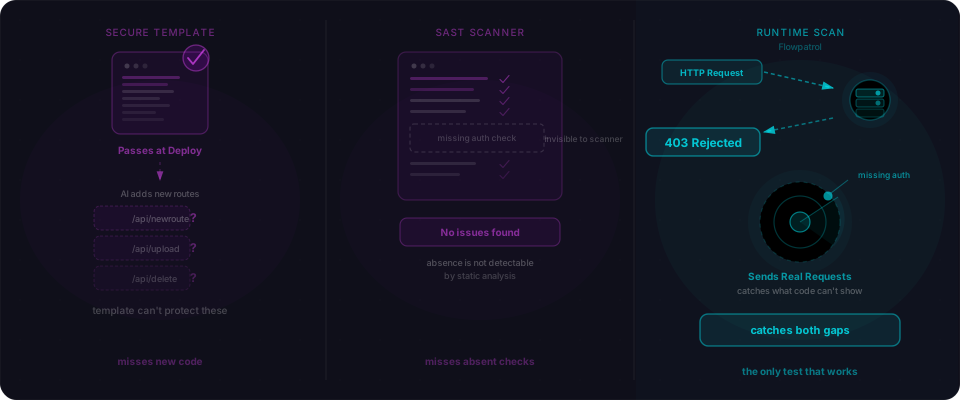
If you want to be sure nothing else is leaking — exposed service role keys, public storage buckets, auth misconfigurations, mass-assignment bugs — that's what Flowpatrol is for. Drop your URL and you'll have a full report in five minutes. Building on Lovable specifically? We wrote a step-by-step Lovable security guide too.
RLS is a PostgreSQL feature. Everything in this article applies to any Supabase project regardless of which AI tool you used to build it. The Supabase RLS documentation covers every edge case and is worth reading alongside this guide.