TL;DR
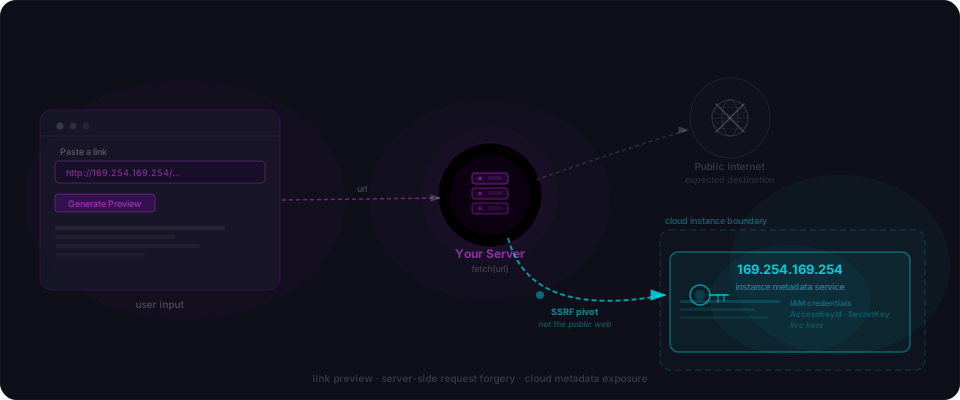
- The bug: your server fetches a URL a user pasted. The user pastes
http://169.254.169.254/latest/meta-data/iam/security-credentials/and your server hands back AWS IAM credentials. - The drill: one Node file, two curls. You'll watch your own server leak a role name, then the keys, in under a minute.
- The fix: resolve the hostname yourself, reject private IPs, turn off redirect following. One block of code.
The drill in 60 seconds
No Docker, no framework scaffold, no repo to clone. One file, two curls, one patch. You'll save a 30-line Express server, POST a normal URL to see the feature work, POST the AWS metadata URL to see it betray you, then drop in the fix and watch the same request get blocked.
Step 1 — Save this file
Install Express once: npm install express. Then drop this into app.js.
// app.js
const express = require('express');
const app = express();
app.use(express.json());

// The pattern every AI code generator produces when you prompt
// "add a link preview feature."
app.post('/api/preview', async (req, res) => {
  const { url } = req.body;
  const response = await fetch(url);
  const body = await response.text();
  res.json({ body });
});

app.listen(3000, () => console.log('up on :3000'));
Nothing exotic. This is the link-preview handler every "paste a tweet", "avatar from URL", and "OG image scraper" feature starts from.
Step 2 — Run it
node app.js
You should see up on :3000. That's the whole server.
Step 3 — The innocent curl
Post a normal URL. The feature works exactly as intended.
# Normal. Feature works.
curl -X POST http://localhost:3000/api/preview \
  -H 'content-type: application/json' \
  -d '{"url":"https://example.com"}'
HTML comes back. You could pull the <title> tag, grab an OG image, render a nice preview card. Ship it. Every link preview on the internet works like this.
Step 4 — The other curl
Same endpoint. Different URL.
# SSRF. Change ONE value.
curl -X POST http://localhost:3000/api/preview \
  -H 'content-type: application/json' \
  -d '{"url":"http://169.254.169.254/latest/meta-data/iam/security-credentials/"}'
That IP isn't on the public internet. 169.254.169.254 is the AWS instance metadata service — a link-local address reachable only from inside an EC2 instance, ECS task, or most Lambda execution environments. Every AWS workload with an attached IAM role can ask it for temporary credentials.
If you ran that curl on your laptop, you got a timeout — your laptop isn't on AWS. If you deploy this exact server to any EC2/ECS/Fargate host with IMDSv1 still enabled, here's what comes back:
$ curl -X POST http://localhost:3000/api/preview ...
{"body":"flowpatrol-lovable-backend-role\n"}

$ curl -X POST http://localhost:3000/api/preview ...
{"body":"{\n  \"Code\": \"Success\",\n  \"AccessKeyId\": \"ASIA...\",\n  \"SecretAccessKey\": \"...\",\n  \"Token\": \"...\",\n  \"Expiration\": \"2026-05-04T21:34:15Z\"\n}"}
First request enumerates the role name. Second request pulls the active keys. Paste those into the AWS CLI and you are the app.
What just happened
The handler does exactly what it advertises: it fetches a URL. "Fetch a URL" and "fetch a URL that happens to be the metadata endpoint" are the same line of code. Your server sits inside a private network the public internet cannot reach. The user's URL borrows that position for a single request, and that's all they need.
The one-line fix
The fix is a URL parse, a DNS lookup, and a private-IP check before the fetch runs. Redirect following goes off.
// app.js — fixed
const express = require('express');
const { lookup } = require('node:dns/promises');
const { isIP } = require('node:net');

const app = express();
app.use(express.json());

const ALLOWED_PROTOCOLS = new Set(['http:', 'https:']);

function isPrivateIp(address) {
  return (
    address.startsWith('10.') ||
    address.startsWith('127.') ||
    address.startsWith('169.254.') ||
    address.startsWith('192.168.') ||
    /^172\.(1[6-9]|2[0-9]|3[0-1])\./.test(address) ||
    address === '::1' ||
    address.startsWith('fc') ||
    address.startsWith('fd')
  );
}

app.post('/api/preview', async (req, res) => {
  const { url } = req.body;

  let parsed;
  try { parsed = new URL(url); }
  catch { return res.status(400).json({ error: 'Bad URL' }); }

  if (!ALLOWED_PROTOCOLS.has(parsed.protocol)) {
    return res.status(400).json({ error: 'Bad scheme' });
  }

  const { address } = await lookup(parsed.hostname);
  if (!isIP(address) || isPrivateIp(address)) {
    return res.status(400).json({ error: 'Blocked' });
  }

  const response = await fetch(parsed.toString(), { redirect: 'error' });
  const body = await response.text();
  res.json({ body });
});

app.listen(3000);
The Capital One connection
In March 2019, an attacker hit a misconfigured web application firewall in front of a Capital One service. The WAF accepted a request that made the backend fetch a URL of the attacker's choice. That URL was http://169.254.169.254/latest/meta-data/iam/security-credentials/ — the exact string you just curled. The metadata service handed over credentials for the *WAF-Role. Those credentials had S3 read on roughly 700 buckets. The attacker ran s3 sync and walked out with 100 million customer records, including 140,000 Social Security numbers and 80,000 bank account numbers.
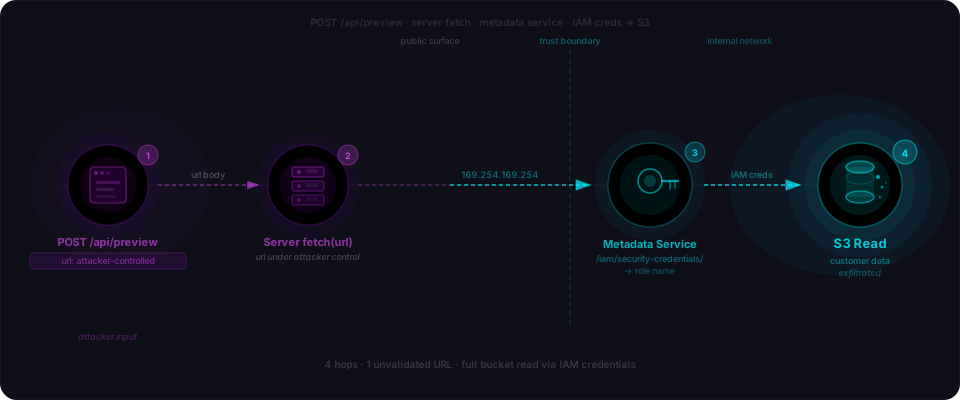
Capital One paid an $80 million OCC fine in 2020 and settled a class action for another $190 million in 2022. The whole chain was four requests.
The only difference between that bug and the one you just ran is that Capital One paid $190 million in settlements for it. Your Lovable app just hasn't been found yet.
Why AI keeps shipping this
The same dynamic shows up in our IDOR walkthrough and our SQL injection drill: the feature works; the adversarial case is never in the prompt.
The variants that catch teams who already fixed it
The naive if (url.includes('169.254')) string check dies to four different tricks. If you're going to patch this, patch for all of them.
Redirect chain. Attacker hosts evil.com on a public IP. Their server returns a 302 Location: http://169.254.169.254/.... Your allowlist check passes on evil.com. Default fetch follows the redirect. Game over.
DNS rebinding. Attacker's DNS returns a public IP on the first lookup (your check), then flips to 127.0.0.1 on the second lookup (your fetch). The hostname passed, the bytes came from loopback.
IPv6 loopback. [::1], [::ffff:127.0.0.1], and [0:0:0:0:0:ffff:7f00:1] all resolve to loopback and sail past any 127. prefix check. IPv6 is the blind spot in most SSRF filters.
Hostname allowlist vs IP allowlist. Allowlisting *.s3.amazonaws.com feels safe until someone uploads a file to a bucket they control and serves a redirect from it. You allowlist hostnames; requests travel to IPs. Those are different checks.
Audit your own app
Five checks you can run today against the code you actually shipped.
- Grep the codebase for
fetch(,axios.,requests.get(,urllib,got(— anywhere user input flows in. Every hit is a candidate. - List every user-facing URL input you expose: link preview, avatar-from-URL, webhook config, OG scraper, URL-to-PDF export, RSS importer, image resizer. Anything that takes a URL and fetches it.
- POST the metadata URL and a loopback URL (
http://127.0.0.1:22,http://[::1]:3000) to each of those endpoints. Anything that doesn't return a clean 400 or 403 is a finding. - Confirm redirect following is disabled in the client library, or resolve + recheck the target after each hop.
- If you're on AWS, confirm IMDSv2 is enforced instance-wide (
HttpTokens=required). IMDSv2 requires a PUT with a session token that most SSRF primitives can't send, and it's a free mitigation.
Closing
This drill catches one endpoint. A real scanner walks every URL input your app exposes and probes each one with the full set — metadata endpoints, loopback, link-local, IPv6 loopback, redirect chains, DNS rebinding, scheme tricks like file:// and gopher://. One missing check compounds into four requests and your S3 bucket.
That's what we built Flowpatrol for. Paste your URL, see what comes back. SSRF sits under OWASP A10 on the web list and API7 on the API list — both of which we test for by default.