The moment you realize anyone can read anyone's data
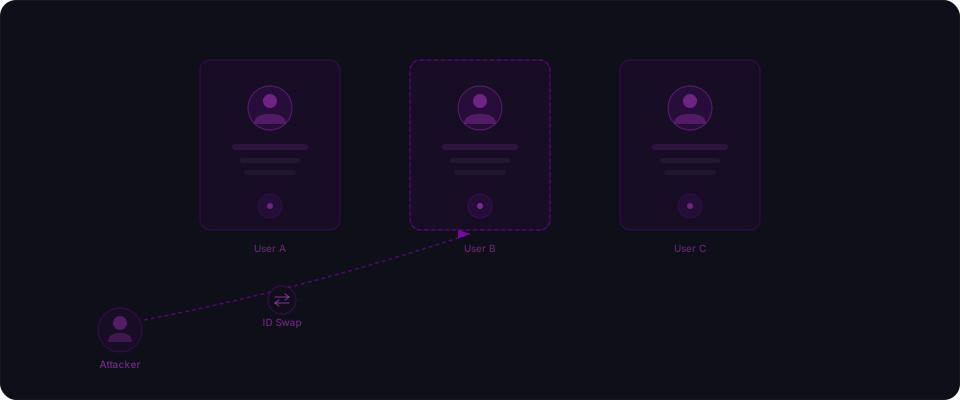
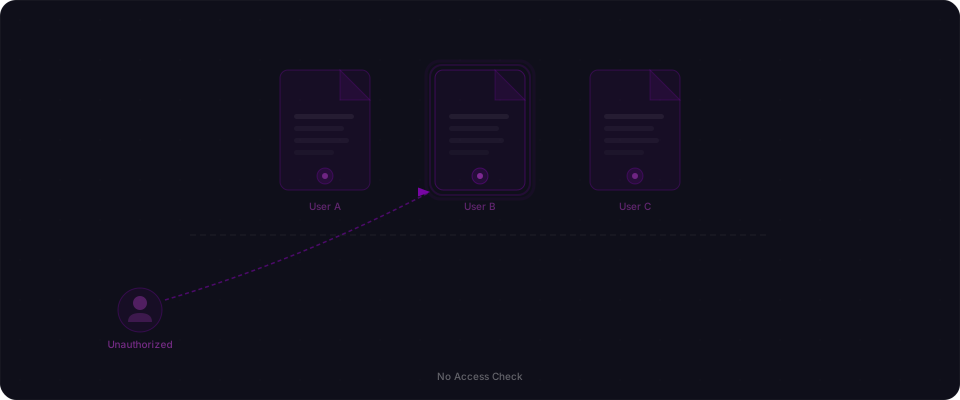
You've shipped. Users are signing up. Real people, real invoices, real data. Then one day — maybe it's a curious user, maybe it's someone with bad intentions — they notice the ID in the URL. They change one character. Your API returns someone else's invoice. Full name, billing address, line items. No error. No 403. Just clean JSON that was never meant for them.
This is IDOR — Insecure Direct Object Reference — and it is the most common vulnerability in AI-generated code. The frustrating part: the AI did exactly what you asked. The code is clean, typed, and fully functional. It just doesn't check whether the person asking for invoice inv_abc123 is the person who owns invoice inv_abc123.
That check is what IDOR is about. And it's invisible when it's missing — no test fails, no build breaks, no console error. Your app looks and feels completely correct until someone decides to go looking.
Why AI keeps generating this bug
This isn't a quirk or a bug in any particular tool. It's structural.
When you write a prompt like "create an API route that fetches an invoice by ID," you're describing a function. The AI generates a function. It parses the ID, queries the database, returns the result. That's the whole job.
Authorization is not a function. It's a policy. It requires knowing three things that aren't in your prompt: who the authenticated user is, what data they're allowed to access, and the specific relationship between this request and those rules. Your AI assistant doesn't know your data model, your user roles, or your business rules. It knows you want an invoice by ID — and it gives you exactly that.
This is the gap. The AI optimizes for "does the code do what the prompt says?" Security is about a different question: "does the code prevent what it shouldn't allow?" Those are two completely separate conversations, and most prompts only have the first one.
Here's the prompt a builder would write:
Create a Next.js API route at /api/invoices/[id] that:
- Takes an invoice ID from the URL
- Fetches it from Prisma
- Returns the invoice as JSON
- Returns 404 if not found
Here's what every major AI tool produces:
// app/api/invoices/[id]/route.ts — what AI generates
import { db } from "@/lib/db";
import { NextResponse } from "next/server";

export async function GET(
  request: Request,
  { params }: { params: { id: string } }
) {
  const invoice = await db.invoice.findUnique({
    where: { id: params.id },
  });

  if (!invoice) {
    return NextResponse.json({ error: "Invoice not found" }, { status: 404 });
  }

  return NextResponse.json(invoice);
}
Clean. Correct. Fully broken. The prompt had no ownership requirement, so the code has no ownership check.
The attack in two curl commands
The exploit doesn't require any special tools. Every user of your app can run this from their browser's dev tools or a terminal.
# User A's legitimate request — their own invoice
curl -H "Authorization: Bearer <user_a_token>" \
  https://yourapp.com/api/invoices/inv_abc123
# {"id":"inv_abc123","userId":"user_a","amount":450,"billingAddress":"..."}

# User A changes the ID — gets User B's invoice
curl -H "Authorization: Bearer <user_a_token>" \
  https://yourapp.com/api/invoices/inv_def456
# {"id":"inv_def456","userId":"user_b","amount":1200,"billingAddress":"..."}
# This should be a 403. It's not.
User A is authenticated. That's not the problem. The problem is that authentication ("are you logged in?") is not authorization ("are you allowed to see this?"). The API verifies the token, gets a valid user, and then ignores that user entirely for the purpose of deciding what data to return.
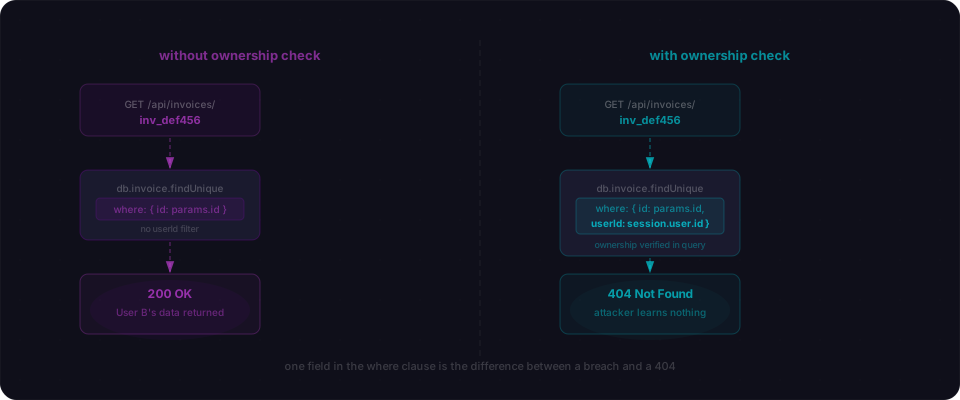
The fix is one line in the Prisma query:
// app/api/invoices/[id]/route.ts — fixed
import { db } from "@/lib/db";
import { getSession } from "@/lib/auth";
import { NextResponse } from "next/server";

export async function GET(
  request: Request,
  { params }: { params: { id: string } }
) {
  const session = await getSession(request);
  if (!session) {
    return NextResponse.json({ error: "Unauthorized" }, { status: 401 });
  }

  const invoice = await db.invoice.findUnique({
    where: {
      id: params.id,
      userId: session.user.id, // ← this is the fix
    },
  });

  if (!invoice) {
    return NextResponse.json({ error: "Invoice not found" }, { status: 404 });
  }

  return NextResponse.json(invoice);
}
Adding userId: session.user.id to the where clause means the database only returns the invoice if it belongs to the requesting user. If someone tries another user's ID, they get a 404. They can't even confirm the invoice exists.
Three patterns, three exploits
IDOR shows up in different shapes depending on what kind of IDs your app uses.
Pattern 1: Sequential integers — trivial to enumerate
GET /api/orders/1
GET /api/orders/2
GET /api/orders/3
Sequential IDs are the worst case. An attacker doesn't need to guess — they just count. A simple script can walk your entire database in minutes. If you're using Prisma's default auto-increment, you almost certainly have this.
The mitigation is not the fix. Switching to UUIDs makes enumeration harder but doesn't fix IDOR. You still need the ownership check. UUIDs just add friction.
Pattern 2: UUIDs — not as safe as they look
GET /api/documents/550e8400-e29b-41d4-a716-446655440000
UUIDs feel unguessable, but that's only partly true. Many apps log IDs in error messages, embed them in shareable URLs, or leak them through other API responses. Once an attacker has one valid UUID — from anywhere — they can use it. The ownership check still matters.
Pattern 3: Write operations — where IDOR becomes dangerous
Read IDORs expose data. Write IDORs destroy it.
// app/api/posts/[id]/route.ts — VULNERABLE DELETE
export async function DELETE(
  request: Request,
  { params }: { params: { id: string } }
) {
  await db.post.delete({
    where: { id: params.id },
  });
  return NextResponse.json({ success: true });
}
# Deletes every post by iterating IDs
for id in $(seq 1 1000); do
  curl -X DELETE https://yourapp.com/api/posts/$id
done
No authentication check at all in this example — another pattern AI generates when you ask for a "simple delete endpoint." The fix:
// app/api/posts/[id]/route.ts — fixed
export async function DELETE(
  request: Request,
  { params }: { params: { id: string } }
) {
  const session = await getSession(request);
  if (!session) {
    return NextResponse.json({ error: "Unauthorized" }, { status: 401 });
  }

  // deleteMany returns a count — 0 means the post didn't exist or wasn't owned by this user
  const deleted = await db.post.deleteMany({
    where: {
      id: params.id,
      authorId: session.user.id,
    },
  });

  if (deleted.count === 0) {
    return NextResponse.json({ error: "Not found" }, { status: 404 });
  }

  return NextResponse.json({ success: true });
}
Using deleteMany (instead of delete) with both the post ID and authorId means the operation is a no-op if the post doesn't belong to the user. The attacker gets a 404 on every request.
The escalation case: IDOR + mass assignment = account takeover
Read and delete IDORs are bad. Write IDORs on profile endpoints are worse — because they can hand over accounts entirely.
// app/api/users/[id]/route.ts — VULNERABLE
export async function PUT(
  request: Request,
  { params }: { params: { id: string } }
) {
  const body = await request.json();
  const user = await db.user.update({
    where: { id: params.id },
    data: body, // entire body, no filtering
  });
  return NextResponse.json(user);
}
Two problems here. First, there's no ownership check — any authenticated user can update any other user's profile. Second, data: body passes the entire request body to Prisma. If an attacker sends { "email": "attacker@evil.com" }, User B's email is now attacker@evil.com. Trigger a password reset on that email — account taken.
If the schema has a role field, send { "role": "admin" }. The same endpoint just made the attacker an admin.
// app/api/users/[id]/route.ts — fixed
export async function PUT(
  request: Request,
  { params }: { params: { id: string } }
) {
  const session = await getSession(request);
  if (!session) {
    return NextResponse.json({ error: "Unauthorized" }, { status: 401 });
  }

  if (params.id !== session.user.id) {
    return NextResponse.json({ error: "Forbidden" }, { status: 403 });
  }

  // Destructure only the fields users are allowed to change
  const { name, bio } = await request.json();

  const user = await db.user.update({
    where: { id: session.user.id }, // use session ID, not URL param
    data: { name, bio },            // role, email, isAdmin are never writable here
  });

  return NextResponse.json(user);
}
Two things happening: an explicit ownership check before the database call, and a whitelist of safe fields. Even if someone bypasses the first check, the query is anchored to the session user and only updates safe columns.
Why static analysis can't catch this
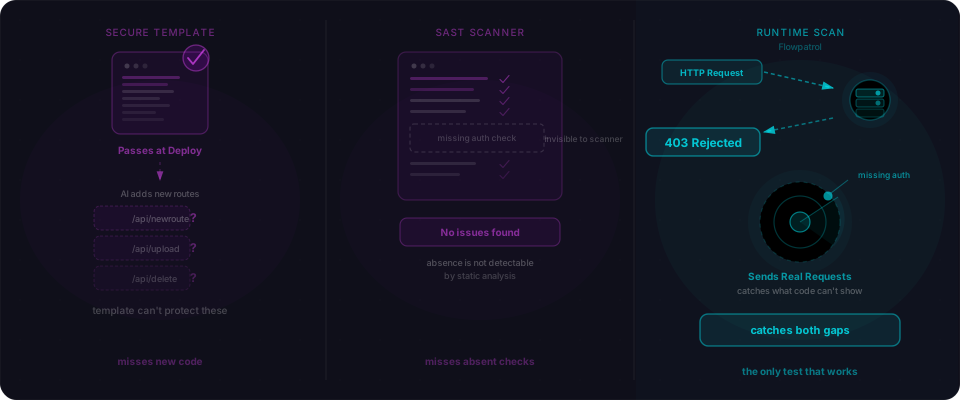
You might wonder why your linter or a static analysis tool doesn't flag these. The answer is that IDOR is not a code syntax problem — it's a semantic problem.
The vulnerable code is syntactically valid. Prisma's findUnique is called correctly. The types are satisfied. The function does exactly what it says. There's no malformed expression, no banned API, no obvious code smell. A pattern-matching tool scanning the AST has no way to know that userId: session.user.id should be in the where clause, because it doesn't know your data model or your authorization requirements.
This is also why AI can catch IDORs during a security review even though AI generates them during development. In generation mode, the AI is completing a prompt — it produces what you described. In review mode, it can reason about the relationship between the authenticated user and the resource being accessed, spot the missing check, and flag it. Those are two different tasks requiring two different kinds of reasoning.
Flowpatrol's scanner does this at runtime: it creates multiple authenticated test users and checks whether User A's requests can access User B's resources. No static analysis — actual HTTP requests with real auth tokens, checking whether the response contains data it shouldn't.
How to find IDORs in your app right now
If you built your app with AI assistance, run through this checklist today.
1. Find every dynamic route.
# Next.js — find all dynamic API segments
find app/api -name "*.ts" | xargs grep -l "params\." | sort

# Or find all [id] directories
find app/api -type d -name "\[*\]"
Every file that reads from params is a candidate.
2. For each one, check the database query.
Does the query include the current user's ID in the where clause? If it fetches by ID alone, you have an IDOR. If it fetches by ID + userId, you're covered.
3. Run the two-account test.
This is the definitive test:
# Log in as User A, create a resource
TOKEN_A=$(curl -s -X POST .../auth/login \
  -d '{"email":"a@test.com","password":"pass"}' | jq -r '.token')

INVOICE_ID=$(curl -s -H "Authorization: Bearer $TOKEN_A" \
  -X POST .../api/invoices -d '{"amount":100}' | jq -r '.id')

# Log in as User B, try to access User A's resource
TOKEN_B=$(curl -s -X POST .../auth/login \
  -d '{"email":"b@test.com","password":"pass"}' | jq -r '.token')

STATUS=$(curl -s -o /dev/null -w "%{http_code}" \
  -H "Authorization: Bearer $TOKEN_B" \
  .../api/invoices/$INVOICE_ID)

echo "Status: $STATUS"
# 200 or 404 (with data) → IDOR confirmed
# 403 or 404 (without data) → you're protected
If User B gets back User A's invoice, that's an IDOR. If they get a 403 or a 404 with no data, the ownership check is working.
4. Check write and delete endpoints too.
Most audits focus on GET. Write and delete IDORs are often worse. For every PUT, PATCH, and DELETE route, run the same two-account test: can User B modify or delete User A's resource?
5. Centralize your auth logic.
Scattered, per-route auth is where IDORs hide. If every endpoint rolls its own getSession call and where clause, someone will miss it. A centralized ownership checker you reuse everywhere is harder to skip:
// lib/auth.ts — reusable ownership check
export async function requireOwnership(
  request: Request,
  resourceUserId: string
) {
  const session = await getSession(request);
  if (!session) throw new AuthError("Unauthorized", 401);
  if (session.user.id !== resourceUserId) throw new AuthError("Forbidden", 403);
  return session;
}
What to do right now
IDOR is quiet. It doesn't crash your app, doesn't trigger alerts, and doesn't show up in any log unless you're explicitly watching for cross-user access patterns. The only way to know if you have it is to test for it.
-
Run the two-account test on every dynamic route in your app. Takes 20 minutes. Costs nothing.
-
Search your codebase for
findUniqueandfindFirstcalls that don't includeuserIdor an equivalent ownership field in thewhereclause. -
Check every PUT and DELETE — not just GET. Write IDORs lead to data destruction and account takeover.
-
Use
deleteManyandupdateManyinstead ofdelete/updatefor user-owned resources. The count-based response pattern makes ownership failures silent and safe. -
Scan with Flowpatrol. Our scanner runs the two-account test automatically across every endpoint we can find — flagging every route where User A can access User B's data. Paste your URL, get a report in five minutes, fix what it finds.
Want the hands-on version of this article? IDOR in 60 seconds — save 30 lines of Express, curl two URLs, and see the missing check. It's the physical reproduction of what we described above.
IDOR is classified under OWASP A01:2021 — Broken Access Control (the #1 web application security risk) and its API-shaped sibling API1:2023 — Broken Object Level Authorization (BOLA). For more on securing AI-generated applications, see our guides on Supabase RLS and Same Default, Four Breaches.