The promise: safety through verification
Tea's core idea was important. Women submit government IDs and verification selfies to build a trusted profile of men in dating. The verified men get reviewed, rated, reported for harassment or assault. The identity check was the entire product. Trust through verification.
By July 2025, hundreds of thousands of women had trusted Tea with their most sensitive data: government IDs, biometric verification selfies, and private messages disclosing assault, abuse, stalking, trauma. Conversations meant for a protected space between women.
Then researchers opened the Firebase Storage bucket.
No authentication required. No API key needed. No login. The entire dataset — all 72,000 photos, all 1.1 million messages, GPS coordinates to users' homes — readable with a single HTTP GET request from anyone on the internet.
The app built to protect women had handed their identity, location, and trauma disclosure to the public internet by default.
What was actually exposed
The numbers here matter. This wasn't a few test records left in a misconfigured bucket. It was the entire identity verification infrastructure of a live app with a real user base.
| Data Type | Records Exposed |
|---|---|
| Government ID verification images (driver's licenses, passports) | 13,000 |
| Profile photos and other images | 59,000 |
| Total images | 72,000 |
| Private messages | 1.1 million |
| GPS coordinates | Users' home locations |
The private messages deserve particular attention. Tea wasn't a general social app. Women used it specifically to share sensitive experiences — to warn others, to process trauma, to report assault. Those conversations, 1.1 million of them, were sitting in an unauthenticated bucket alongside the GPS coordinates of where users lived.
The government IDs tied everything together. A driver's license contains a legal name, date of birth, home address, and a photo. A passport contains even more. Combine that with a home location from GPS data and private messages describing personal trauma, and you have a profile that no attacker should ever be able to construct from a single GET request.
Firebase Storage: the surface developers forget
Most builders who've heard about Firebase misconfiguration think of the Realtime Database or Firestore — the database products. The Firebase misconfiguration epidemic we covered earlier was almost entirely about those products: open .read/.write rules that let anyone query the entire database.
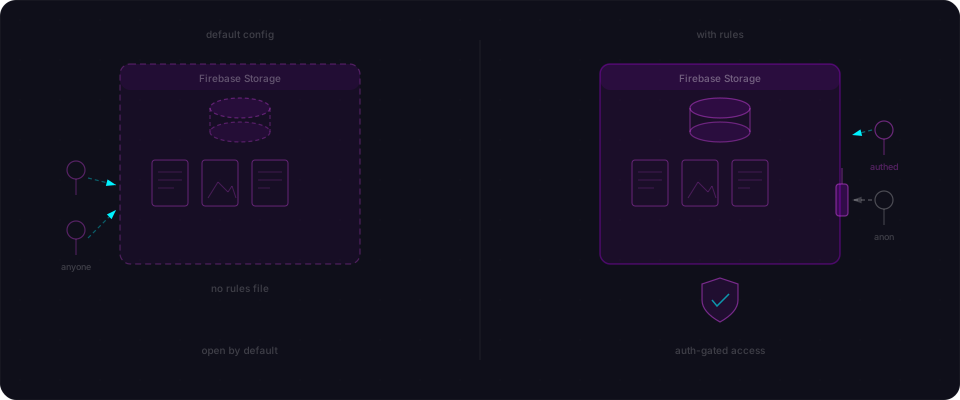
Firebase Storage is a different product. It's Google Cloud Storage with Firebase auth integration layered on top — designed for files, images, and binary data. It has its own separate security rules, in a separate console section, with a separate default configuration.
And that default is the problem.
When you create a new Firebase Storage bucket, you pick between two starting rule sets:
Production mode locks the bucket down — nothing is readable without authentication.
Test mode opens everything:
rules_version = '2';
service firebase.storage {
  match /b/{bucket}/o {
    match /{allPaths=**} {
      allow read, write: if true;
    }
  }
}
That if true means exactly what it says: read and write anything, no authentication required. Some versions default to allow read, write: if request.auth != null instead, which looks safer until you realize what it means — any user with any Firebase Auth token can read everything. An attacker registers a throwaway account (which Firebase allows by default), gets a token, and suddenly they have access to every file in the bucket. No ownership check. No per-user rules. Just: "authenticated? Here's all the data."
Worse, because Storage is a separate surface from Firestore or the Realtime Database, it's easy to lock down your database rules, feel confident about your security posture, and completely miss the open storage bucket sitting next to it. Many builders don't even realize they have a storage bucket until they check.
For Tea, researchers attribute the misconfiguration directly to AI-generated code that was never audited. This is how AI scaffolds Firebase apps: initialize the client, connect storage, read and write files. Everything works immediately. The happy path is frictionless. But the security rules? They don't appear in your IDE. They don't appear in your generated code. They live in a different Firebase Console section entirely. Unless you explicitly go looking, you never know what's actually set — and by the time you deploy to production, thousands of users have already trusted you with their government IDs.
Why the researchers pointed at AI-generated code
This matters for our audience specifically. The Tea breach wasn't attributed to a veteran developer who knew better and got lazy. Researchers attributed the insecure setup to AI-generated code that was never audited for security configuration.
That's a precise description of how vibe-coded apps ship. You describe what you want. The AI builds it. Everything runs. You launch.
Firebase tutorials — including official Google examples — scaffold apps by having you choose a starting mode and start building. The initializeApp() call and getStorage() call appear in the generated code. The security rules don't. They live in a different place in the Firebase Console, and they don't surface in your IDE, in your build output, or in any error message until someone hits a protected path and gets denied.
AI tools scaffold the happy path. They don't scaffold the adversarial audit. That's your job, and if you don't know to go looking, the bucket ships open.
The Cal AI breach earlier this year followed the same pattern — an open Firebase backend, an auth system that anyone could brute-force, and health data that became a BreachForums dataset. Tea is the same technical failure in a context with immediate physical safety implications.
The real-world harm: 4chan, lawsuits, physical risk
The reason this breach belongs in a different category from most data exposures is what happened after the data was accessible.
Names of men accused of assault circulated on 4chan. The verification data that was supposed to support private accountability became public doxxing material. Men who may or may not have been accurately accused had their information spread through forums with no context, no moderation, and no recourse. Whether you consider that deserved or not, it wasn't what Tea's users consented to when they submitted reports. They were using a private system. That system was open to the public internet.
Class-action lawsuits followed. When an app's entire value proposition is safety and privacy — when users submit government IDs precisely because they trust the platform with identity-grade data — a public storage breach is a fundamental product failure, not an operational hiccup.
And then there's the physical dimension. GPS coordinates pointing to users' home locations, combined with government IDs containing home addresses, combined with private messages identifying who those users are: that's a package that enables stalking. The women who used Tea to protect themselves from unsafe men had their location data handed to anyone who looked.
This is what Firebase misconfiguration looks like when the data being stored isn't product reviews or user preferences. It's biometric identity data for a population that was specifically seeking safety.
What builders handling identity verification data must do
If you're building anything that touches identity verification — government IDs, facial matching, KYC flows, or even just profile photos — the standard Firebase defaults are not enough. Here's the configuration model for this data.
| Rule | What to set | Why |
|---|---|---|
| Storage read access | request.auth.uid == userId | Only the owning user can read their own files |
| Storage write access | Server-side only via Admin SDK | Client-side writes bypass validation |
| Verification images | Separate bucket, no client access | Verification images should never be client-readable after upload |
| GPS data | Never store raw coordinates | Store city/region only, or don't store location at all |
| Private messages | Encrypted at rest, user-scoped rules | `read: if request.auth.uid == message.senderId |
| Government ID images | Delete after verification | Don't retain what you don't need to retain |
The locked-down Firebase Storage rule for user-scoped file access looks like this:
rules_version = '2';
service firebase.storage {
  match /b/{bucket}/o {
    // User profile photos — only the owning user can read/write
    match /users/{userId}/profile/{allPaths=**} {
      allow read, write: if request.auth != null
                         && request.auth.uid == userId;
    }

    // Verification images — write only, no client reads after upload
    // Reads handled server-side via Admin SDK
    match /verification/{userId}/{allPaths=**} {
      allow write: if request.auth != null
                   && request.auth.uid == userId;
      allow read: if false; // Admin SDK only
    }

    // Deny everything else
    match /{allPaths=**} {
      allow read, write: if false;
    }
  }
}
Verification images in particular should never be readable by the client after upload. Once a user submits an ID for verification, that image should be processed server-side and then locked. If your rules allow a client to read it back, an attacker with any valid token can read anyone's government ID — because Firebase Storage rules often grant read access to any authenticated user, not just the document owner, when developers are moving fast.
Data minimization is the other half of this. Tea stored 1.1 million private messages and GPS coordinates. Ask whether you need to store what you're storing. Location data for a safety app might need to show proximity warnings — but it doesn't need to store the precise home coordinate in a Firebase bucket. Process it, use it, and discard it.
What you should do right now
The Tea breach was reported by TechCrunch on July 26, 2025 and covered by NPR on August 2, 2025. The bucket was publicly accessible. No exploit was needed. If you're building with Firebase — especially if you used AI to scaffold it — do these five things today:
1. Check your Storage rules in 60 seconds.
Go to Firebase Console → Storage → Rules. You should see something like this:
rules_version = '2';
service firebase.storage {
  match /b/{bucket}/o {
    match /users/{userId}/{allPaths=**} {
      allow read, write: if request.auth.uid == userId;
    }
    match /{allPaths=**} {
      allow read, write: if false;
    }
  }
}
If you see allow read, write: if true or just allow read, write: if request.auth != null with no uid check, your bucket is open. Fix it now before you do anything else.
2. Test your bucket access without credentials.
From a terminal, try to read a file without authentication:
gsutil -m ls gs://YOUR-PROJECT.appspot.com
If this succeeds, your bucket is readable by anyone. Stop. Fix the rules before you resume.
Alternatively, curl a file directly:
curl "https://firebasestorage.googleapis.com/v0/b/YOUR-PROJECT.appspot.com/o/users%2Ftest.jpg?alt=media"
If you get the file back instead of a 403 Forbidden, the bucket is open.
3. Check every bucket separately.
Firebase projects can have multiple storage buckets. Each has its own independent rule set. Check them all.
4. Delete what you don't need.
Government IDs, verification selfies, precise GPS coordinates — once you've verified a user or processed a request, do you still need these files? If not, delete them. The data you don't store can't be breached.
5. Scan your app end-to-end.
Flowpatrol checks for exactly this — exposed Firebase Storage, Firestore, Supabase backends, both readable without authentication. Paste your URL and get a report in five minutes. You'll know where you stand before someone else tells you.
The Tea breach happened because an app built to protect people shipped with open defaults. The people using Tea submitted their government IDs because they trusted the platform. The fix is straightforward: rules are a dozen lines. The audit takes ten minutes. There's no reason to ship without it.
This case study is based on public reporting by TechCrunch (July 26, 2025), NPR (August 2, 2025), Cyber Kendra, and ComplexDiscovery. Reported data exposure figures are as documented in that coverage.