"The code barrier is dead"
That's what the founder of Abrahub posted on X. He had built a Brazilian SaaS platform generating roughly $100,000 a month — without writing a single line of code. AI tools did the building. He did the vision. The product worked, customers paid, and the story spread fast across every builder community that wanted to believe the same thing was possible.
It was a real win. Proof that the tooling had crossed a threshold. Not a demo, not a toy — a working business generating real revenue with no traditional development required.
Then a user named Tiago looked at the API.
What Tiago found
Tiago didn't use a scanner. He didn't run a brute-force tool. He made some ordinary API requests — the kind any developer makes while exploring an unfamiliar backend. He opened the network tab, watched what endpoints the app called, and tried them himself.
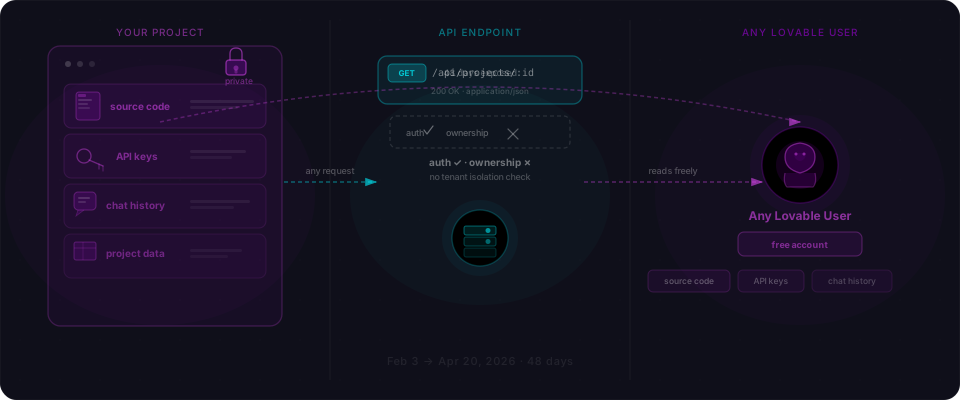
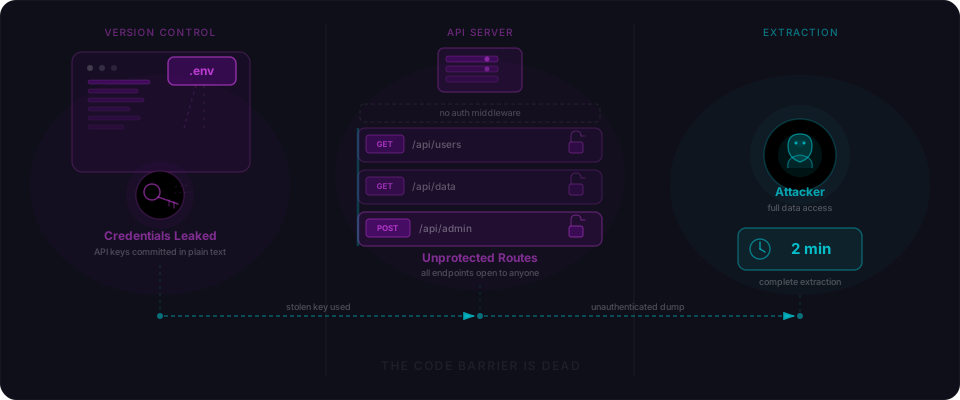
Every request came back with data. No session required. No token. No login. The routes weren't protected. An unauthenticated caller and an authenticated one got identical responses — full user data, returned unconditionally.
Tiago exfiltrated personal data in under two minutes. He posted about it publicly.
That's when Igor Barroso — maintainer of FastCRUD and founder of FastroAI — published his now-viral r/vibecoding post on April 6, 2026. His four-word summary of the breach: "Not hacking, there was no door to open."
No CVE was assigned. There was no framework flaw to assign one to. The routes simply never checked who was calling them.
The committed .env
While Tiago's two-minute breach came through the unprotected API, a separate inspection of Abrahub's public GitHub repository uncovered something independent: a .env file committed with all production credentials.
Database connection strings, JWT signing secrets, Stripe API keys, email service keys, admin credentials — all of it readable by anyone who found the repo. This is what a typical committed .env looks like:
# .env — committed by mistake, visible in git history indefinitely
DATABASE_URL=postgresql://user:password@prod-host:5432/abrahub
JWT_SECRET=my-production-jwt-secret-key
STRIPE_SECRET_KEY=sk_live_xxxxxxxxxxxxxxxxxxxxxxxx
SENDGRID_API_KEY=SG.xxxxxxxxxxxxxxxxxxxxxxxxxxxx
ADMIN_API_KEY=internal-admin-key-not-for-public
This happens because the pattern is structural. AI tools scaffold a .env for local development. Tutorials say to do the same. The .gitignore entry that should exclude .env gets missed, or excludes .env.local but not .env itself. On the first git add ., the secrets file goes in.
And once a secret is in Git history, deleting the file doesn't help. The credentials stay in the commit log permanently and are browsable via git log — or GitHub's own commit view — until history is explicitly rewritten.
Two doors, neither locked
This is what makes the Abrahub incident worth understanding carefully: the two vulnerabilities were completely independent. Either one alone was catastrophic. Together, they gave an attacker total access through two separate paths.
| Vulnerability | Severity | How to find it | How to fix it |
|---|---|---|---|
| No auth middleware on API routes | Critical | curl any endpoint without a token — does it return data? | Add a session check at the top of every handler, or apply global middleware before route registration |
.env committed to public GitHub | Critical | git log --all -- .env — if anything returns, it was committed | Rotate all secrets immediately, then rewrite history with git filter-repo |
Tiago didn't even need the .env to exfiltrate user data — the unprotected routes were enough. But anyone who found the GitHub repo would have had the JWT signing secret, which lets you forge authentication tokens for any user, including admin accounts, without needing credentials.
What broken and fixed look like
The broken pattern is a route that runs without checking who's calling. Here's what AI tools typically generate:
// VULNERABLE — no auth check, returns data to anyone:
app.get('/api/users', async (req, res) => {
  const users = await db.query('SELECT * FROM users');
  res.json(users);
});
It works. The AI's job was to create a /api/users endpoint that returns users. It did exactly that. What's absent is the check that wasn't in the prompt.
Here's what the protected version looks like:
// SECURE — auth check applied before handler runs:
app.get('/api/users', requireAuth, async (req, res) => {
  const users = await db.query(
    'SELECT * FROM users WHERE org_id = $1',
    [req.user.org_id]
  );
  res.json(users);
});
And in a Next.js App Router context:
// VULNERABLE — no session check:
export async function GET(request: Request) {
  const data = await db.select().from(users);
  return Response.json(data);
}

// SECURE — session required, data scoped to the caller:
export async function GET(request: Request) {
  const session = await getServerSession(authOptions);
  if (!session) {
    return new Response('Unauthorized', { status: 401 });
  }

  const data = await db
    .select()
    .from(users)
    .where(eq(users.userId, session.user.id));

  return Response.json(data);
}
The fix has two parts: the session check, and scoping the query to the authenticated user's own data. A route that blocks unauthenticated callers but then returns all users to authenticated ones still has a problem. Both halves matter.
The safest pattern applies auth at the application level rather than per-route. Global middleware means future routes can't accidentally skip the check:
// Apply before any route registration
app.use('/api', requireAuth);

// Every /api/* route is now protected automatically
app.get('/api/users', handler);
app.get('/api/orders', handler);
// Future routes are covered too
Check your own app right now
Five steps, in order of urgency:
1. Make unauthenticated requests to your API endpoints.
Open a terminal and hit your data routes without any session or token:
# Should return 401, not data
curl -s -o /dev/null -w "%{http_code}" https://yourapp.com/api/users
# Expected: 401
# If 200: that endpoint is open to anyone
Every endpoint that returns data without a session cookie or Authorization header is unprotected.
2. Search your Git history for committed secrets.
git log --all --full-history -- .env
If anything comes back, the file was committed at some point. Rotate every credential in it immediately — database password, JWT secret, Stripe keys, all of it — before doing anything else. Then rewrite history:
git filter-repo --path .env --invert-paths
git push origin --force --all
3. Move to global middleware.
If your API has more than a handful of routes, apply auth at the middleware level before registering any routes. This guarantees every current and future route is protected by default.
4. Add .env to .gitignore before your next commit.
echo ".env" >> .gitignore
echo ".env.local" >> .gitignore
echo ".env.production" >> .gitignore
git status  # Confirm .env does NOT appear as untracked
5. Use your platform's secret management instead of .env files in production. Vercel Environment Variables, Railway Variables, and Fly.io secrets inject values at runtime without a file in the repo. There's no .env file to accidentally commit.
Flowpatrol tests every discovered endpoint with and without authentication, flags routes that return data to unauthenticated callers, and checks for exposed credentials in linked repositories. Paste your URL and see what it finds.
The founder of Abrahub built something real — a profitable product, no code required. That part of the story stands. The gap was the step that comes after the app works: the check that asks what happens when someone who shouldn't have access tries anyway.
That check takes five minutes to run. Two minutes less than it took Tiago.
Technical details sourced from Igor Barroso's April 6, 2026 r/vibecoding post and the FastroAI Vibe Coding Security Checklist. The breach occurred in Q1 2026. No CVE was assigned — this was a configuration absence, not a framework vulnerability.