TL;DR
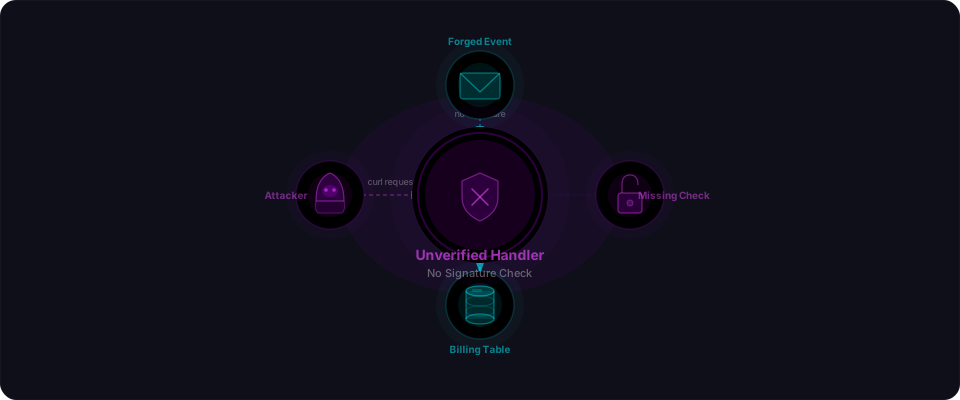
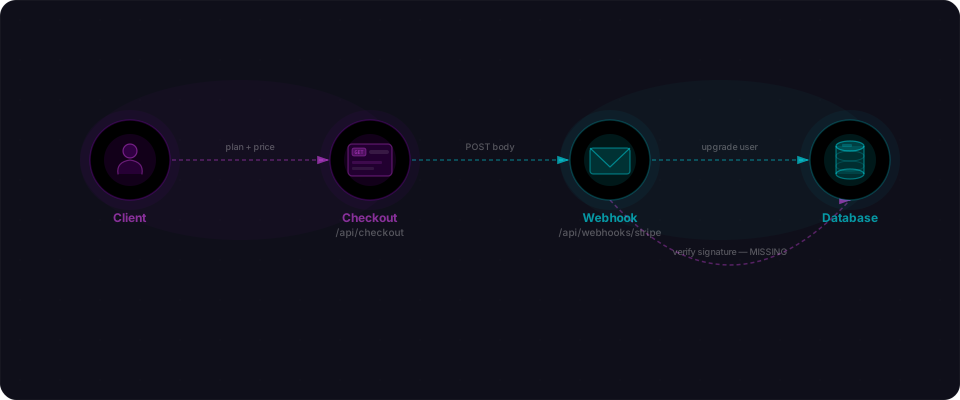
The Stripe quickstart teaches you how to accept webhook events. The verification step lives on a different page. AI code generators consistently skip the second page, and that one omission turns your billing handler into a free upgrade button for anyone who can guess the URL.
The drill, in 60 seconds
One file. One command. One curl. No framework, no container, nothing to clone. You're going to stand up the exact pattern AI code generators produce, forge an event against it, watch it succeed, then fix it in six lines.
Open a terminal. Let's go.
Step 1 — Save this file (30 seconds)
Drop this into webhook.js. It's pure Node stdlib — no npm install, no dependencies. This is the shape of code a model hands you when you ask for "a Stripe webhook handler."
// webhook.js — the pattern AI code generators produce.
// Receives an event, parses the body, "upgrades" the user.
// Notice what's missing.
const http = require('http');

const server = http.createServer((req, res) => {
  if (req.method !== 'POST' || req.url !== '/webhook') {
    res.writeHead(404);
    return res.end();
  }

  let body = '';
  req.on('data', (chunk) => (body += chunk));
  req.on('end', () => {
    const event = JSON.parse(body);

    if (event.type === 'payment_intent.succeeded') {
      const userId = event.data.object.metadata.user_id;
      console.log('upgraded user:', userId, '→ premium');
    }

    res.writeHead(200, { 'Content-Type': 'application/json' });
    res.end(JSON.stringify({ received: true }));
  });
});

server.listen(3000, () => console.log('listening on :3000'));
Thirty lines. Looks reasonable. Runs clean. It's also completely forgeable.
Step 2 — Run it (5 seconds)
node webhook.js
Step 3 — Forge an event (20 seconds)
Open a second terminal. Send a hand-typed Stripe event at the handler. No signature header. No secret. No Stripe involved at all.
curl -X POST http://localhost:3000/webhook \
  -H "Content-Type: application/json" \
  -d '{
    "type": "payment_intent.succeeded",
    "data": {
      "object": {
        "amount": 9900,
        "currency": "usd",
        "metadata": { "user_id": "user_47" }
      }
    }
  }'
Flip back to the first terminal:
That's the punchline. A stranger just marked user_47 as premium, for free, with a JSON blob they typed by hand.
What just happened
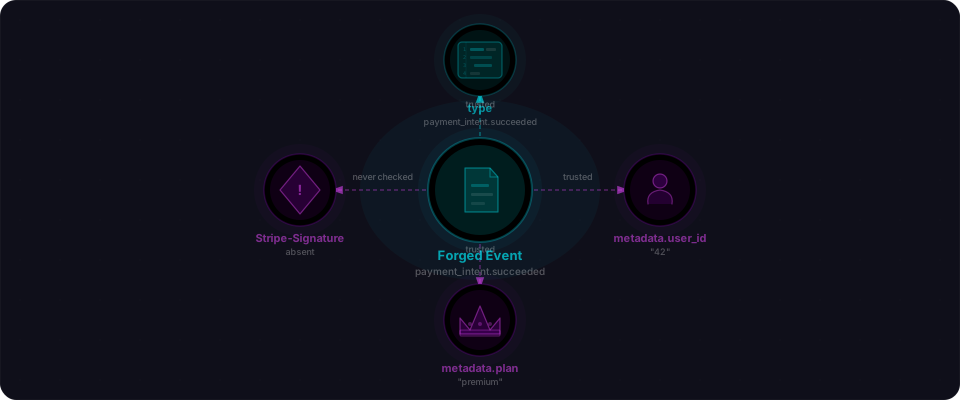
Four things lined up, and any one of them being different would have stopped the attack:
- The webhook URL is publicly reachable. It has to be — Stripe needs to call it.
- The handler trusts any POST body it receives. It parses the JSON and acts on it immediately.
- Stripe signs every real event with HMAC-SHA256 using a shared secret you get from the dashboard.
- The handler never checks the signature. So Stripe's sender identity is unverified.
Combine those and you get a write endpoint to your billing table, sitting on the open internet, accepting instructions from anyone.
Fix it (30 seconds)
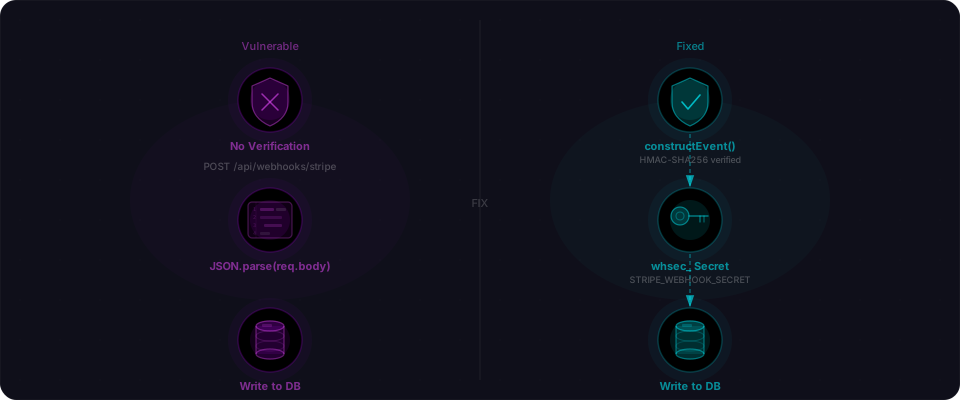
Six lines. That's the whole fix.
const stripe = require('stripe')(process.env.STRIPE_SECRET_KEY);
const sig = req.headers['stripe-signature'];
let event;
try {
  event = stripe.webhooks.constructEvent(rawBody, sig, process.env.STRIPE_WEBHOOK_SECRET);
} catch (err) {
  return res.writeHead(400).end(`Webhook Error: ${err.message}`);
}
constructEvent runs HMAC-SHA256 over the raw body using your webhook secret and rejects anything that doesn't match. Two things to get right: pass the raw body bytes (not re-parsed JSON — the signature is computed over the exact bytes Stripe sent), and grab STRIPE_WEBHOOK_SECRET from the Stripe dashboard under Webhooks → your endpoint → Signing secret. It starts with whsec_.
Re-run the same curl from Step 3 against the fixed handler and you'll get:
Audit your own app right now
Three checks. Each one takes less than a minute against your production code:
- Grep your webhook handler for
constructEvent. If it's not there, you have this bug. Full stop. There is no other way to verify a Stripe signature. - Check your checkout endpoint. Does it accept an
amount,price, orcurrencyfield from the client, or does it look the price up server-side bypriceId? If the browser picks the number, the browser picks the number it wants. - Look at your Stripe dashboard. Under Developers → Webhooks, confirm your production endpoint is in live mode and that test-mode events are not being accepted by your production URL. Mixing the two is a common way to ship the verified handler and still be forgeable.
Why AI code generators miss this
The Stripe quickstart shows the happy path: receive the body, parse JSON, update the database. Signature verification is on a different documentation page. Models pattern-match to the shortest working example in their training data, and the shortest working example is the one without the check. It runs fine locally. It runs fine in staging. The first time it matters that the six lines are missing is the first time someone runs the drill you just ran against your live URL.
This drill catches one bug. A black-box scanner catches the compounding chain — client-side price tampering, unguarded refund handlers, missing idempotency, mass-assignment on the plan field. That's what Flowpatrol is built for. Drop your live URL in and we'll walk every billing path the way an attacker would, in about five minutes.