The rule that opened 3.2 million health records
On March 9, 2026, a threat actor posted 14.59 GB of Cal AI user data on BreachForums. Cal AI is a popular calorie and fitness tracking app with over 3.2 million active users. The dataset included meal logs, dates of birth, weight history, dietary restrictions, fitness goals, and the 4-digit PINs users relied on for authentication. At least one record belonged to a user born in 2014 — a child.
Health data is different from other breached datasets. It's covered under HIPAA, GDPR, CCPA, and state privacy laws in ways that names and email addresses aren't. A 12-year-old's weight history, calorie intake, and dietary needs are not information parents expect to be sitting on the open internet.
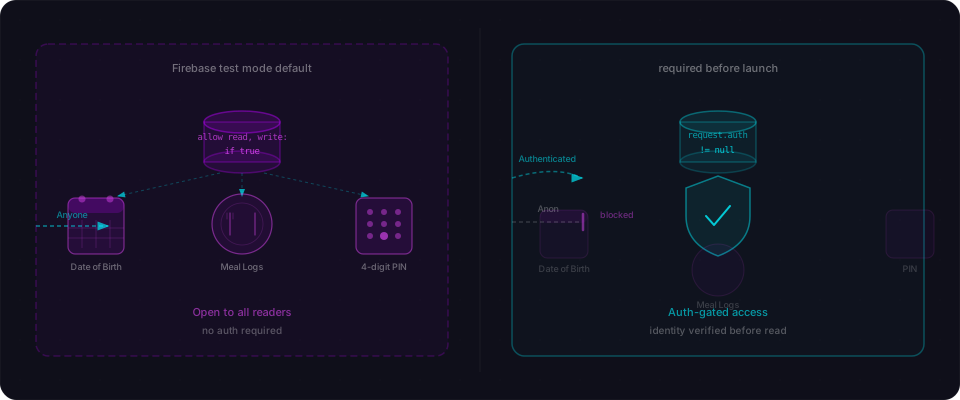
The misconfiguration was brutally simple. Cal AI's entire Firebase backend was protected by a single rule applied to every collection:
allow read, write: if true;
That's not a rule. That's an open door. Anyone on the internet could read, write, or delete any record — and nothing in the development workflow flagged it.
What made this worse: they paired an open database with an authentication system protected by nothing but a 4-digit PIN — 10,000 possible combinations — with zero rate limiting. An attacker could brute-force any user's PIN in under a minute.
What was actually in those 14.59 GB
This wasn't a list of email addresses or password hashes. It was health data — the category of personal information that privacy laws protect most heavily.
| Data Type | Impact |
|---|---|
| Meal logs | Daily food intake, portions, calorie counts — a detailed picture of someone's eating patterns |
| Dates of birth | Full birthdays including year — enables identity theft and age-based targeting |
| Weight records | Historical weight data over time — sensitive health information |
| Dietary restrictions | Allergies, intolerances, religious restrictions — tied to medical history |
| Fitness goals | Weight loss targets and timelines — exploitable for social engineering |
| 4-digit PINs | The only authentication mechanism protecting all other data |
| Children's records | At least one user born in 2014 — COPPA/GDPR-protected data |
The child's record is worth emphasizing. Any app serving users under 13 must comply with COPPA (Children's Online Privacy Protection Act), which requires verifiable parental consent, limits data collection, and carries penalty fines up to $43,792 per violation. Cal AI stored a 12-year-old's health data. It exposed that data to the internet. COPPA doesn't care about your Firebase rules — it cares that you failed to keep the data safe.
Two failures that made one catastrophe
The real story isn't just the open database. It's that Cal AI had two completely broken security mechanisms, and they both had to fail for the breach to happen at scale.
Failure #1: The Firebase rule
allow read, write: if true;
This is the root cause. But a truly locked-down auth system could have contained it. Cal AI didn't have that.
Failure #2: The PIN authentication with zero rate limiting
A 4-digit PIN has exactly 10,000 possible combinations. If someone can try all 10,000 without hitting a rate limit, a single user account takes 60 seconds to compromise at normal HTTP speeds. Automated across 3.2 million accounts with parallel requests, you break into the entire user base in about an hour.
Cal AI had no rate limiting. No account lockout after 5 wrong attempts. No throttling to 1 request per second. Nothing. You could fire 10,000 PIN guesses at the same account back-to-back and every single one would succeed or fail without any pushback.
Combine these two failures:
- Unauthenticated database access: An attacker doesn't even need a PIN. They can read the entire database with an unauthenticated HTTP request.
- If someone wanted to use the app normally: A 4-digit PIN with no rate limiting took 60 seconds to crack.
One failure is bad. Both failing together is a total collapse.
How this happened: Firebase test mode in production
Cal AI's Firestore backend looked like this:
rules_version = '2';
service cloud.firestore {
  match /databases/{database}/documents {
    match /{document=**} {
      allow read, write: if true;
    }
  }
}
That's Firebase Test Mode. It's a scaffolding tool meant for local development — ship fast, think about security later. Except Cal AI's project shipped this to production — and nothing in the workflow prompted anyone to revisit it.
Here's why this pattern keeps repeating:
Firebase defaults are frictionless during development. Test Mode = everything works immediately. No auth errors, no permission denials, no errors to debug. The app flows perfectly. So you ship.
AI code generators don't write security rules. They initialize the Firebase client, wire up reads and writes, and ship. Everything works because the database is open. The AI never checks what the rules say. It's your responsibility to audit — and most builders don't know to look.
There's no deployment blocker. Firebase doesn't prevent you from pushing Test Mode to production. It warns you in the Console UI (a yellow banner) but only if you visit the Rules tab. Deploy via CLI? Build with an AI scaffolder? You may never see that warning. No email. No blocking check. No "are you absolutely sure?"
This is the exact same pattern that led to 916 exposed Firebase projects with 125 million user records (detailed in our Firebase Misconfiguration article). Cal AI is that pattern with health data attached, plus a child's personal information, plus another layer of broken auth on top.
Check your own Firebase rules in 60 seconds
If you built with Firebase (or any tool that scaffolds Firebase), do this right now.
Step 1: Open your Firebase Console
Go to firebase.google.com → select your project → Firestore Database → Rules tab.
Step 2: Search for the danger signal
Look for if true anywhere in the rules. If you see this at the root level, stop and fix it immediately:
match /{document=**} {
  allow read, write: if true;
}
That's Test Mode. That's what Cal AI shipped. That's open to the internet.
Step 3: Check the yellow warning
Firebase shows a yellow banner saying "Rules are public" if your database is open. If you've never seen that banner, you haven't looked at your Rules tab.
Step 4: Look for hidden openness
Even if you don't see if true, ask yourself:
- Does any rule allow unauthenticated reads?
- Is there a catch-all at the root that doesn't check authentication?
- Did you copy a tutorial's rules without understanding them?
What locked-down actually looks like
Here's the baseline. Deny everything by default. Open access only where you explicitly need it:
rules_version = '2';
service cloud.firestore {
  match /databases/{database}/documents {
    // Users can only read/write their own data
    match /users/{userId} {
      allow read, write: if request.auth != null
                         && request.auth.uid == userId;
    }

    // Public content: read-only for everyone, write-only for admins
    match /public_recipes/{document} {
      allow read: if true;
      allow write: if request.auth != null
                   && request.auth.token.admin == true;
    }

    // Default: deny everything
    match /{document=**} {
      allow read, write: if false;
    }
  }
}
Start with if false at the root. Then open access only where you have a specific, documented reason. Don't rely on defaults. Don't copy tutorials without reading them.
Before you ship health or sensitive data
If you're building anything that touches health, fitness, weight, diet, or personal information, add these checks before launch:
| Check | Your Real Question |
|---|---|
| Firebase rules | Have I actually visited the Rules tab, or am I shipping with whatever I generated? |
| Authentication | What happens if someone submits the wrong credential 100 times? Do they get blocked? |
| Data minimization | Am I storing dates of birth, weight history, GPS coordinates, or other data I don't actually use? |
| Age verification | Could someone register as a 12-year-old? If yes, am I handling their data under COPPA? |
| Encryption | Is PII encrypted at rest, or am I relying entirely on access control? |
| Backup policies | If my database is compromised, how long until I notice? Do I have automated alerts? |
Health data isn't just another database. It's covered under HIPAA, GDPR, CCPA, and COPPA. Mishandling it isn't a security incident — it's a legal liability.
Your action list — do this today
The Cal AI breach happened because two security systems failed completely. Neither failure is exotic. Both are the default when you scaffold with AI and ship without a security review.
Right now:
-
Check your Firebase rules immediately. Open the Firebase Console → Firestore → Rules. Search for
if true. If it appears at the root level anywhere, you have Test Mode in production. Fix it before you do anything else. If you don't see a Rules tab, you definitely haven't audited your rules. -
Test your authentication. Open a terminal. Submit 20 wrong password or PIN attempts in 5 seconds against your own account. What happens? Do you get blocked? Throttled? Locked out? Or do all 20 requests succeed silently? If it's the last one, you have a brute-force vulnerability. Add rate limiting immediately.
-
List every field you're storing. Dates of birth. Weight. Meal logs. GPS coordinates. Religion-based dietary restrictions. For each field, ask: do I actually need to store this? Data you don't collect can't be breached. Data minimization is your friend.
-
Test without authentication. Open an incognito window. Try hitting your API endpoints directly with no auth header or token. If you get user data back, you have a public endpoint. Every public endpoint needs to be intentional, documented, and audited.
-
Run a security scan before launch. Flowpatrol checks for exactly these patterns in minutes: open Firebase and Supabase backends, missing authentication, exposed secrets, unprotected endpoints. It takes 60 seconds. One scan could prevent what happened to Cal AI.
This case study is based on public reporting by Cybernews, SC Media, HackRead, and Kiteworks. The breach was first reported on March 9, 2026, when the threat actor posted the dataset on BreachForums. The MyFitnessPal 2018 breach is documented in public records including Under Armour's disclosure and reporting by Wired.