The Worm That Turned Developers Into Spreaders
September 8, 2025. 13:16 UTC. An attacker published malicious versions of 18 npm packages — debug, chalk, and others — downloaded 2.6 billion times per week, combined.
Two hours later, the community caught it. But in those 120 minutes, something unprecedented happened: the infection did not just reach your project. It reached your ~/.npmrc, and then it published infected versions of every npm package you maintained.
Self-propagating. Exponential. Autonomous. This was the first confirmed self-replicating worm in npm history — and it had a name: Shai-Hulud.
Here's what happened, how the worm spread, and what you need to check right now.
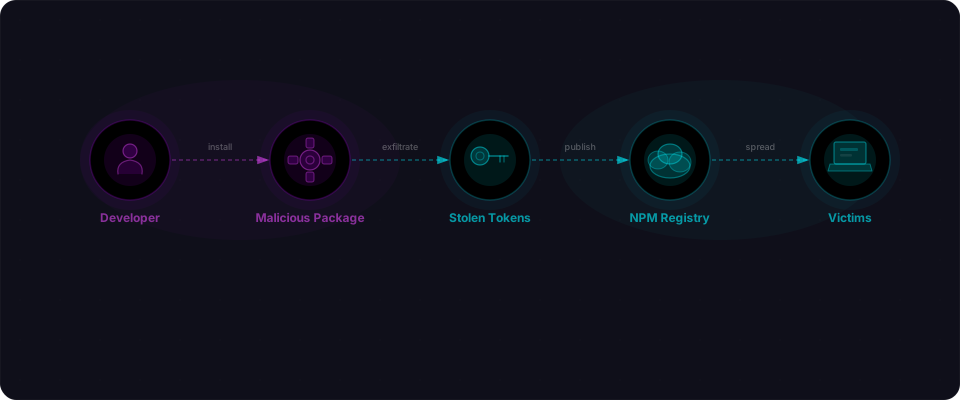
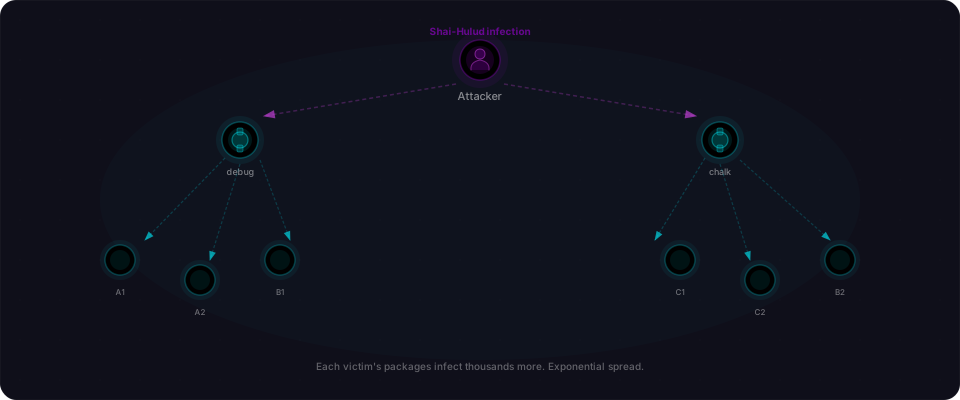
If you ran npm install during that window and your dependency tree included debug or chalk, you got infected. The malicious code sat quietly in your node_modules — invisible during CI/CD, undetectable by static analysis. Then came the escalation: if you maintained any npm packages of your own, the worm stole your npm auth token and autonomously published infected versions of every package you controlled. Those packages were installed by thousands of developers. The cycle repeated. Each new victim became a new publisher.
No additional attack needed. No human clicking. No phishing link sent twice. One compromise triggered exponential spread across the entire dependency graph.
The packages you trust
Before getting into the attack, it helps to understand what these packages actually are.
debug is a tiny logging utility. You use it to print diagnostic messages during development. It has around 500 million weekly downloads — which makes it one of the most-installed packages in existence. It shows up as a dependency of Express, Mocha, and dozens of other foundational tools. Your app almost certainly has it, even if you never installed it directly.
chalk adds color to terminal output. It's what makes your build tools print green "success" and red "error" messages. Around 150 million weekly downloads. Same story: it's everywhere, often several levels deep in your dependency tree.
These packages are infrastructure. They're so ubiquitous that most developers have never thought about them as a security surface. They're just... there. Like the operating system or the runtime.
That invisibility is exactly what made them valuable targets.
How the attack started
The attackers didn't find a zero-day in npm's infrastructure. They didn't brute-force maintainer accounts. They sent emails.
On September 5, 2025, they registered a domain: npmjs.help. Convincing enough at a glance. Three days later, they sent phishing emails to the maintainers of 18 popular packages. The emails had a clear, urgent message: 2FA update required by September 10th. Failure to act would result in publish access being revoked.
Classic urgency trick. A deadline three days away. An action that sounds routine. A domain that looks plausible if you're reading fast.
Enough maintainers clicked, entered their credentials, and handed over their npm tokens. The attackers published malicious versions of 18 packages. The compromised releases landed in the registry at 13:16 UTC on September 8th.
What the malicious code actually did
The payload was clever in how it avoided detection.
The wallet-stealing code ran browser-side only. No server-side execution, no filesystem access during a Node.js install — just JavaScript that activated when a user's browser loaded a page. This kept it clean during CI/CD pipeline runs, where security tooling tends to look hardest.
When a user visited a page in a compromised app and initiated a crypto transaction, the malicious code intercepted the API call. It read the destination wallet address and ran it through a Levenshtein distance algorithm — a technique that measures the similarity between two strings — to find a lookalike address it controlled. Then it swapped the real address for the fake one.
The swap was designed to look legitimate. A Levenshtein-similar address shares most characters with the real one. In the fraction of a second before you confirm a transaction, you're unlikely to spot a difference in characters 28 through 34 of a 42-character Ethereum address.
Supported targets: Ethereum, Bitcoin, Solana, Tron, Litecoin, Bitcoin Cash. If you were building a payment interface or crypto dashboard with any of the affected packages in your dependency tree, your users' transactions were at risk.
The two-hour window
The attack timeline was tight:
| Time (UTC) | Event |
|---|---|
| Sep 5 | Attackers register npmjs.help phishing domain |
| Sep 8, 13:16 | Malicious package versions published to npm |
| Sep 8, ~15:20 | Community spots anomalies in package diffs |
| Sep 8, ~15:30 | Incident response begins, packages flagged |
| Sep 9 | CISA issues advisory: "Widespread Supply Chain Compromise Impacting npm Ecosystem" |
Two hours from publish to discovery. That's fast — genuinely impressive community response. Package diff monitoring tools, eagle-eyed maintainers, and npm's own security team all played a role.
But two hours is also a long time in npm terms. If your project ran npm install in that window — a fresh dependency pull, a CI build, a deploy — you got the infected version. No action required on your part. The infection was passive, automatic, and invisible.
How the propagation chain worked
When Palo Alto Unit 42 analyzed the attack, they named the self-replicating component "Shai-Hulud" — and the mechanic is worth understanding because it's what turned a supply chain attack into a contagion.
Phase 1: Installation. You run npm install. The malicious version of debug or chalk lands in your node_modules. The payload is browser-side only — it does not execute during npm install itself. No alarms. No CI/CD pipeline red flags.
Phase 2: Credential theft. The code scans your filesystem for npm auth tokens — usually stored in ~/.npmrc, environment variables, shell history, or credential managers. It reads whatever it finds and sends it to attacker infrastructure.
Phase 3: Autonomous republish. Here's the escalation. If you maintain any npm packages yourself, the worm uses the stolen token to publish infected versions of your packages directly to npm registry. No human involved. No additional vulnerability needed. The token is valid — your own legitimate credentials.
Phase 4: Downstream infection. Your packages get installed by thousands of developers. The cycle repeats. Each new victim who maintains packages becomes a new publisher. The infection spreads exponentially.
This is what made it a worm, not just a supply chain attack. Previous incidents required attackers to target individual package maintainers directly (phishing, brute force, etc.). Shai-Hulud automated the spread: each victim automatically became an attacker, with no additional effort from the original threat actor.
The threat didn't stop
What happened after September isn't just epilogue. The attackers iterated aggressively:
November 2025 — Shai-Hulud 2.0: Palo Alto Unit 42 tracked a second wave using 25,000+ malicious GitHub repos operated by ~350 accounts. The worm evolved. Alongside credential theft, version 2.0 added a "scorched earth" fallback: if it couldn't steal credentials, it deleted the victim's entire home directory. Destructive and opportunistic.
December 29, 2025 — Shai-Hulud 3.0: Multi-platform evasion techniques designed to bypass detection signatures written for earlier variants. The tooling kept evolving, same as any active malware family.
Three versions in four months. The threat actor was treating this like a product, iterating on detection evasion the same way a security tool iterates on accuracy.
Why vibe-coded apps were specifically vulnerable
Here's where this connects directly to how you probably built your app.
When an AI tool generates your backend — Cursor, Lovable, Claude, v0 — it writes a package.json with caret ranges by default:
{
  "dependencies": {
    "debug": "^4.3.4",
    "chalk": "^5.3.0",
    "express": "^4.18.2"
  }
}
That ^ means "this version or any newer compatible version." When you run npm install, npm pulls whatever the current latest is. If the latest was published 90 minutes ago by an attacker who compromised the maintainer's account, you get that version — automatically, invisibly, without warning.
Pinned versions would have protected you:
{
  "dependencies": {
    "debug": "4.3.4",
    "chalk": "5.3.0",
    "express": "4.18.2"
  }
}
No caret. Exact version. You get what you asked for.
The AI tools follow ecosystem conventions — caret ranges are standard and safe 99.99% of the time. But the 0.01% of the time when a popular package gets poisoned, every fresh install in that window gets the payload.
Three compounding factors hit vibe-coded apps harder:
- Lockfiles are treated as disposable.
package-lock.jsonshould be committed and used withnpm ciin production. But fast projects regenerate locks casually, runningnpm installfresh on each deploy. That bypasses lockfile protection entirely. - Deep dependency trees mean hidden risk. Your app might not directly depend on
debug. But Express does. So does your test runner. So does your linter. You have hundreds of transitive dependencies you've never evaluated — any one of which can become a supply chain vector. - You can't audit training data. When Claude or Cursor recommends
debug, the recommendation is sound. It's in a million training examples. But the training data stops in the past. No AI tool can predict which packages will be compromised on September 8th.
Check your app right now
If you have a Node.js project that ran npm install or npm ci between September 8–9, 2025, run this immediately:
Step 1: Check if you have the infected packages in your lockfile
# The fastest check: look at your package-lock.json timestamp
stat package-lock.json

# If mtime shows September 8-9, 2025, you likely pulled the malicious versions
# Even if it's older, check when you last deployed
Step 2: See if any of your own packages were auto-published
If you maintain npm packages, this is critical:
# Go to https://npmjs.com/settings/[your-username]/packages
# Check version history for each package
# Look for releases between September 8-10, 2025 that you didn't publish yourself
# If found: this is proof of compromise
Step 3: Rotate your npm token immediately
# This invalidates any tokens the worm may have stolen
npm token revoke [old-token-id]

# Then create a new one
npm token create --read-only
If you don't remember the exact token IDs, go to https://npmjs.com/settings/[username]/tokens and revoke everything created before this moment. Generate new tokens. You're invalidating potential attacker access in under 2 minutes.
Step 4: Re-install your project from scratch
# Delete lockfile and node_modules
rm -rf node_modules package-lock.json yarn.lock

# Fresh install with current packages
npm install
Lockfiles are your first defense
The single most important habit is treating your lockfile as a security artifact.
Commit your lockfile. package-lock.json and yarn.lock go in version control. They're a cryptographic record of what you intended to install. They protect you against exactly this scenario.
Use npm ci in CI/CD. Not npm install. npm ci installs exactly what's in the lockfile. If someone changed package.json without updating the lockfile, it fails loudly.
Review lockfile diffs in PRs. When a dependency updates, the lockfile diff shows every transitive change. Tools like Socket.dev automate this and flag suspicious new packages or unpublished deps.
Here's what good hygiene looks like:
# In your CI pipeline
npm ci                          # Not npm install
npm audit --audit-level=high    # Fail on high/critical
npm list debug chalk            # Spot-check known-risky packages
Ship bulletproof
You can't prevent the next supply chain attack. But you can prevent it from spreading through your app.
Five things to do today:
-
Check your lockfile timestamp. If you deployed between September 8–9, 2025, you got the worm. Verify above.
-
Rotate your npm tokens immediately. Go to npmjs.com → settings → tokens. Revoke old tokens, create new ones.
-
Commit your lockfile from now on. This is non-negotiable. Version control matters.
-
Use
npm ciin production. Notnpm install. This pins you to the exact versions your app was tested with. -
Scan your app before you ship. Flowpatrol runs a security audit in under five minutes. We check for exposed tokens, dependency issues, and common misconfigurations that static analysis misses. Paste your URL, get a report, sleep better.
The Shai-Hulud incident proved that vibe-coded apps are not inherently less secure — they're just new. You didn't choose to depend on debug or chalk; your build tool did. But you can choose to lock down how those dependencies are installed and managed.
Do that, and you've made the next attack significantly harder.
The September 2025 Shai-Hulud worm was documented by Palo Alto Unit 42, Socket Security, and CISA's advisory "Widespread Supply Chain Compromise Impacting npm Ecosystem." Variants and escalations were tracked through November and December 2025.