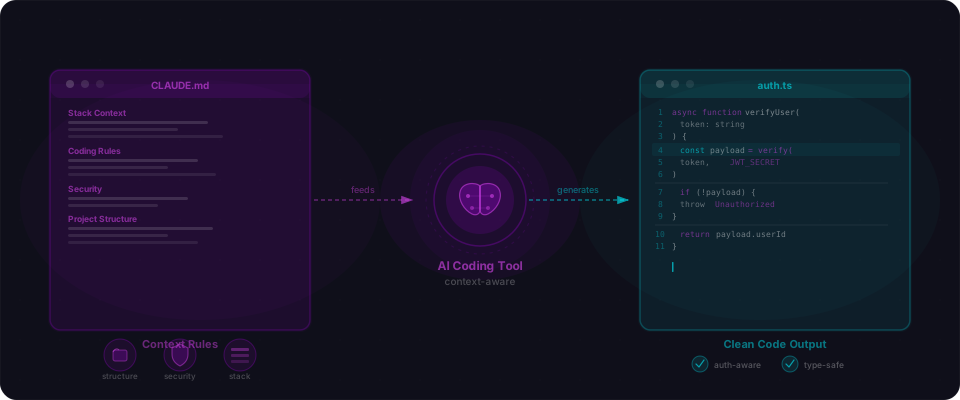
Every builder has the same experience. The same AI writes clean, working code in one session and garbage in the next. Same model. Same editor. Same prompts. Different outcome.
It's measurable, too. Bolt users report that the 50th prompt in a project produces noticeably worse code than the 5th — duplicated components, lost naming conventions, subtle regressions. Cursor users find that rules injected at the start of a session slowly lose influence as the context fills up. Lovable builders hit a wall after a couple dozen messages where the AI starts contradicting its own earlier decisions. The tools are fine. The context is the bottleneck.
The difference isn't which tool you picked. It's how you briefed it, how you planned the work, and how you managed the context window. The techniques below are the ones experienced Claude Code, Cursor, and Lovable users actually lean on. None of them require a bigger model. All of them compound every time you ship.
Why longer sessions produce worse code
This isn't a vague feeling. It's a measurable property of the transformer architecture that powers every AI coding tool.
Transformers process your entire conversation — every prompt, every response, every error message — through an attention mechanism that decides which parts of the input to focus on for each new token it generates. In theory, attention can look at everything equally. In practice, it doesn't. As the input grows longer, the model starts favouring recent tokens over older ones. Your carefully written instructions from message one compete with the error trace you pasted in at message forty — and the error trace usually wins.
Chroma's 2025 research tested 18 frontier models on this exact problem and found every single one degrades as input length increases. The relationship is worse than linear: doubling the length of a task roughly quadruples the failure rate. Anthropic's own context engineering guide frames it bluntly — context is a finite resource with diminishing marginal returns.
That's the constraint every technique in this guide works around. Rules files front-load critical context so it doesn't get drowned. Specs reduce the decisions the model has to guess at. Plan mode keeps exploration out of the implementation window. Compacting clears the noise. Subagents isolate research into fresh context windows so the parent stays clean. Every move below is a different way to keep the signal-to-noise ratio high inside a fixed-size window.
One brain for every AI tool
Every serious AI coding tool now reads a project instructions file. The messy bit used to be that each tool wanted its own filename. That's finally changing. OpenAI launched AGENTS.md in August 2025 as an open standard, and as of December it's stewarded by the Linux Foundation's Agentic AI Foundation alongside MCP. Over 60,000 repos have adopted it, and it's read natively by Codex CLI, Cursor, Copilot, Windsurf, Amp, Devin, Jules, and Gemini CLI.
Claude Code still prefers CLAUDE.md. The clean solution is to make AGENTS.md your canonical source of truth and symlink CLAUDE.md to it. Both tools read the same file. Your team never has to remember which editor is open.
# AGENTS.md

## Stack
- Next.js 15 (App Router, React Server Components)
- TypeScript 5.7 strict
- Supabase (Postgres + Auth) with RLS on every table
- Drizzle ORM — **not** Prisma
- Tailwind v4, shadcn/ui

## Commands
- Install: `pnpm install`
- Dev: `pnpm dev`
- Verify: `pnpm typecheck && pnpm lint && pnpm test`
- Migrate: `pnpm db:push`

## Non-negotiables
- Every Supabase table has RLS on, filtered by `auth.uid()`
- `service_role` key is server-only — never under `NEXT_PUBLIC_*`
- Every API route re-checks the session — middleware is not enough
- No `any`, no `@ts-ignore`, no `dangerouslySetInnerHTML`Cursor replaced the old flat .cursorrules file with .cursor/rules/*.mdc in version 0.45, late 2025. Each rule file has YAML frontmatter with three fields that matter: description (used when the agent requests a rule by intent), globs (auto-attaches the rule when matching files are touched), and alwaysApply (pins the rule to every request). Use Always for stack facts. Use globs for file-type-specific rules — tests, migrations, API routes. Use Agent Requested sparingly.
Lead with the nevers, not the dos
Positive rules are low-signal. The model already knows how to write a React component. Negative rules are where the value lives. Tell it what your codebase doesn't do, what tripped you up last week, which library you tried and ripped out, which folder not to touch.
## Never do this in this codebase

- Never add Prisma. We use Drizzle. Mixing them is the bug.
- Never add new files under `packages/legacy/`. That folder is being sunset.
- Never use `any` or `@ts-ignore`. If you need either, stop and ask.
- Never put secrets in `NEXT_PUBLIC_*`. Those ship to the browser.
- Never make `/api/*` routes without re-checking `getUser()` — middleware is not enough.
- Never use raw `fetch` in components. Use the typed client in `lib/api.ts`.
- Never style with inline CSS. Tailwind utilities or nothing.
- Never "refactor while you're here." Change only what I asked for.
Every "never" reshapes the guess distribution more than a wall of positives ever will. The model already knows thousands of frameworks. What it doesn't know is which patterns your project abandoned.
Split rules files by subtree
Claude Code and Cursor both auto-load nested rules files: a CLAUDE.md or .cursor/rules/*.mdc sitting inside a sub-folder loads only when the agent works inside that folder. Use this to keep the root file tight and push module-specific rules into the folders they apply to.
your-project/
├── AGENTS.md                    # Root: stack, commands, non-negotiables
├── CLAUDE.md → AGENTS.md        # Symlink
├── apps/
│   ├── web/
│   │   └── CLAUDE.md            # Web: Server Components, routing quirks
│   └── api/
│       └── CLAUDE.md            # API: auth, rate limiting, error shape
├── packages/
│   └── db/
│       └── CLAUDE.md            # DB: migration rules, naming conventions
└── .cursor/rules/
    ├── stack.mdc                # alwaysApply: true
    ├── testing.mdc              # globs: "**/*.test.ts"
    └── db.mdc                   # globs: "packages/db/**/*.ts"
The root file stays readable. The module files carry the stuff only relevant when you're working in that corner of the codebase — and only then.
Write a spec before you write a prompt
The fastest way to get worse code is to start with "build me X." The fastest way to get better code is to write a short Markdown spec first and paste it into the chat. GitHub's spec-kit puts it bluntly: every feature must trace back to a concrete user story with clear acceptance criteria.
Five minutes of spec saves an hour of rewriting. A spec forces you to make the decisions before the model does. Once they're on paper, the model implements them instead of guessing. Most so-called "hallucinations" are just the model filling in details you never bothered to decide.
A spec worth pasting has six parts: a one-sentence problem, a one-line user story, the data shape, the API contract, non-goals, and two or three reference files that show the pattern you want matched. Add a short acceptance checklist at the bottom and you're done.
# Spec: Add comments to blog posts

## Problem
Readers want to discuss posts. We have no discussion surface.

## User story
As a logged-in reader, I can leave a comment, edit my own, and
delete my own. Admins can delete anyone's.

## Data
- Table `comments(id, post_id, user_id, body, created_at, updated_at)`
- RLS: SELECT public; INSERT/UPDATE/DELETE gated by `auth.uid() = user_id`
- Admin policy: role `admin` can DELETE any row

## API
- `POST /api/posts/[id]/comments` → `{ body: string }`
- `GET  /api/posts/[id]/comments` → array, oldest first
- `PATCH /api/comments/[id]` → `{ body: string }`, author only
- `DELETE /api/comments/[id]` → author or admin

## Non-goals
No threading. No reactions. No markdown rendering — plain text,
sanitised on render.

## Reference files
- `app/api/posts/route.ts` — API route + session check pattern
- `lib/supabase/server.ts` — server client factory
- `e2e/posts.spec.ts` — acceptance test pattern

## Acceptance
- [ ] `pnpm test e2e/comments.spec.ts` passes
- [ ] RLS migration applies cleanly
- [ ] Logged-out POST returns 401
- [ ] User A cannot DELETE User B's comment
Save this as plan.md or specs/comments.md. It becomes the artifact every session reads before touching code — including the sessions that happen three days from now, after you've forgotten which decisions you made.
Plan first, then write the code
Claude Code has a Plan mode. Hit Shift+Tab twice, or launch the session with --permission-mode plan. In that mode Claude can read, search, and think — but it cannot edit a single file until you approve the written plan. Armin Ronacher describes it as "Claude in a read-only state where it analyzes your codebase and proposes a plan."
Use it for anything non-trivial. The first draft of anything complex is the draft you'd reject if a human wrote it. Planning separates that rejection into thirty seconds of reading a plan, instead of reverting a hundred lines of code you just watched stream into your editor.
# Enter plan mode (two ways)
Shift+Tab Shift+Tab   # toggle from inside a session
claude --permission-mode plan   # launch already in plan mode

# Describe the work (or paste your spec)
> Read plan.md. Propose a plan for the first unchecked item.
  Show me the files you'd touch and the order.

# Claude reads, searches, writes a plan — no files modified.
# When you approve, plan mode exits and Claude implements.Critique the plan, then split it
Don't rubber-stamp the first plan the model gives you. Push back. The best critique prompts are short and reusable:
- "What's the riskiest step in this plan? Why?"
- "What did you assume here that I didn't actually tell you?"
- "Which steps could run in parallel, and which have to be sequential?"
- "What's the smallest version of this plan that would still deliver value?"
- "Split this into three smaller plans I can ship one at a time. Each plan must be independently mergeable — no half-built state between them."
That last one is the most important. Smaller plans mean smaller context windows, which means better execution. A plan that takes five files and one test is a good plan. A plan that takes twenty files across four layers of the stack is a future refactor disguised as a feature.
Once you have your final plans, write each one to its own file — plan-01-schema.md, plan-02-api.md, plan-03-ui.md — and ship them one at a time in separate sessions. You'll thank yourself on day three, when the migration plan has been merged, the API plan is in review, and the UI plan is the only thing in active context.
Point at code, not adjectives
The single most underused move in AI coding: instead of describing what you want in words, point the model at a file that already does it right.
"Follow the pattern in app/api/posts/route.ts" beats any adjective you could reach for. The model will read the file and copy the style, the auth check, the error envelope, the naming, the response shape — all for free.
# Bad
Create an API route for comments with auth and good error handling.

# Good
Create app/api/comments/route.ts. Follow the exact pattern in
app/api/posts/route.ts — same session check, same error envelope,
same response shape. Query the comments table, filter by the
logged-in user's id. Read lib/supabase/server.ts so you use the
correct server client factory.
Rule of thumb: name at least two existing files in every non-trivial prompt. One for the pattern you want copied, one for a helper the new code will call. If you can't name two, the spec isn't ready.
Compact the context at every milestone
Claude Code has two commands you should learn like you learned git: /compact and /clear.
/compact summarises the session and restarts with the summary pre-loaded. A 70,000-token conversation can compress to around 4,000. You lose nothing structural and get most of your attention budget back. Don't wait for auto-compact to fire at the context limit — compact manually at every clean milestone. Feature done? Compact. Commit landed? Compact. Switching from planning to implementation? Compact.
Even better: pass a focus argument so the summary keeps what you care about and drops what you don't.
# At a milestone
/compact

# At a milestone, with a focus hint
/compact focus on the auth refactor and drop the test output

# Before switching from planning to implementation
/compact keep the plan, drop the exploration
After compact, your first message should re-anchor the session: "Next up: the GET endpoint. Read plan.md for current state."
Clear when the context turns against you
/compact summarises. /clear wipes. Use clear, not compact, when the conversation is poisoned — the model is stuck on a wrong hypothesis, repeating the same failed fix, or still thinking about a feature you abandoned an hour ago. Compacting bad context just gives you a compact version of bad context.
This isn't superstition. Anthropic's context engineering guide treats context as a finite resource with diminishing marginal returns — every token in the window is a tax on the ones you add next. Chroma's 2025 context rot study tested 18 frontier models on long inputs and found every single one degrades as input length increases. The practical version: doubling the length of a task roughly quadruples the failure rate. It's not a model defect. It's a property of the transformer.
After /clear, Claude reloads your rules file automatically. Your first message should re-anchor: "Read plan.md. Next task: finish step 3. Touch only files under app/comments/."
Keep a scratchpad the agent actually reads
Context is ephemeral. Files are not.
The single most durable piece of advice in Anthropic's context engineering guide is structured note-taking outside the context window. Create a plan.md — or NOTES.md, or scratchpad.md, pick one and commit to it — that the agent reads at the top of every session and updates as it works. It survives /compact. It survives /clear. It survives you closing the laptop for a weekend. When the context evaporates, the scratchpad is still there.
# plan.md — live scratchpad for the comments feature

## Status
- [x] Migration written (packages/db/migrations/0042_comments.sql)
- [x] RLS policies added and tested
- [x] POST /api/comments + session check
- [ ] GET /api/comments — in progress, pagination undecided
- [ ] PATCH / DELETE routes
- [ ] CommentList.tsx component
- [ ] e2e test

## Decisions made
- Plain text only, no markdown rendering
- Oldest first, no pagination yet (revisit at >50 comments/post)
- Admin delete via a SQL function, not a new RLS policy

## Open questions
- Soft-delete or hard-delete? Leaning soft.
- Rate limiting — Upstash or Postgres function?

## Next action
Finish GET /api/comments. Copy the pagination shape from
app/api/posts/route.ts.
Wire it into your rules file so the agent does it automatically:
## Session start
Read plan.md before doing anything else. Update it as you work —
status checklist, decisions, open questions, and the "next action"
block. Never leave plan.md stale.
Plan in a throwaway session, implement in a clean one
The best way to keep an implementation session clean is to plan somewhere else entirely.
Open a fresh conversation. Push the model through research and planning. Let it read files, argue with itself, chase dead ends, and iterate on the plan until you're happy. Then have it write the final plan to plan.md — and close that session. Open a new conversation for implementation, one that reads only plan.md and the reference files. Every token of exploration, hypothesis, and dead-end reasoning stays out of the session that actually writes your code.
Session 1 — Planning (throwaway)
─────────────────────────────────
1. Fresh chat
2. Paste spec + reference file names
3. Let the model explore, ask questions, read files
4. Iterate on the plan until you're happy
5. "Write the final plan to plan.md. Include status,
   decisions, open questions, next action."
6. Close the session. No need to keep it.

Session 2 — Implementation (clean)
──────────────────────────────────
1. Fresh chat, zero context from session 1
2. First prompt: "Read plan.md and the files it references.
   Implement the next unchecked item. Update plan.md as you
   go. Run verify before marking done."
3. Keep the session focused on one feature
4. Compact at milestones, clear when switching features
5. Close when the feature is done
Planning is messy. Implementation should not be. When they happen in the same context window, the messiness of planning bleeds into the cleanliness of execution. Separating them costs you nothing and buys you a model that's fully present for the part that matters.
Make the agent track its own work
Claude Code has a built-in TodoWrite tool the agent uses to track its own multi-step work. Even without it — Cursor, Lovable, Bolt — you can fake the same pattern by telling the model to write out a numbered list at the start and update it as it goes.
The difference feels the same as the one between a junior dev who says "ok working on it" and one who writes out the plan, checks boxes, and shows their work. A visible todo list gives you a failure mode where you can see the agent skipping a step. Without one, the agent quietly drops the thing you asked for at step 7 and tells you it's done.
# Drop this at the end of any non-trivial prompt

Before you start:
1. Break this into a numbered todo list.
2. Mark exactly one item in progress at a time.
3. After each item: run verify, then mark it done.
4. If you get stuck, leave a note on the failing item
   and stop — do not skip ahead.

Format:
- [x] Done
- [→] In progress
- [ ] Pending
Delegate research to subagents
Every agentic tool now has some version of a subagent — Claude Code's Task tool, Cursor's background agents, Codex sub-agents. The thing to understand is that each subagent runs in its own fresh context window, and only its final message returns to the parent session.
That's the whole point. You can send a subagent off to read a thousand files, trace a call graph, or audit a folder, and your main conversation stays clean. Intermediate tool calls, logs, and search results stay inside the subagent. The parent only sees the summary.
Anthropic's own multi-agent research system outperformed a single Opus-4 by 90.2% on research tasks — not because the subagents were smarter, but because the parent could ask good questions without being buried in results.
Send to a subagent:
- "Find every place in this repo that calls
getUser(). Return the file:line list only." - "Read the RLS policies in
packages/db/migrations/and summarise which tables are missingauth.uid()checks." - "Audit
app/api/for routes that don't re-verify the session. List the files and the problem. Don't fix anything." - "Read the Stripe webhook docs and summarise the exact signature verification code we need."
- "Run the test suite. Summarise failures in under 200 words."
Keep in the main session:
- Anything that requires your running context to make a judgement call
- Anything where you'll need to see the intermediate steps, not just the answer
- Small lookups the main session can do in two tool calls
Teach the agent to verify its own work
Put your verify command in the rules file and make it a rule — with no exceptions — that the agent runs it before declaring anything done. pnpm typecheck && pnpm lint && pnpm test takes twenty seconds. Skipping it produces the classic AI coding experience: you accept the change, deploy it, and find out about the type error, the failing test, and the missed import at the worst possible moment.
# Add to your AGENTS.md / CLAUDE.md

## Verify before done
Before telling me a task is complete, run:

    pnpm typecheck && pnpm lint && pnpm test

If any step fails, fix it before reporting done. If you can't
fix it, stop and explain what you tried. Never say "complete"
without a clean verify run. This rule has no exceptions.
Bonus: make it part of the prompt too, not just the rules file. A belt-and-braces sentence at the end of every significant request — "Run verify before you mark this done and paste the last ten lines of output" — catches the agent that noticed your rule but decided it didn't apply this time.
Research, plan, implement, verify — in that order
Everything in this guide composes into one workflow: research the area, plan the work, implement the plan, verify the result. Treat the four phases as gates, not suggestions. You don't skip to implement because you're in a hurry. You don't skip verify because the test suite is slow.
1. RESEARCH
   Send a subagent: "Find every place X pattern exists. Summarise."
   Read the 3 most relevant results yourself. Ask one follow-up.

2. PLAN
   Plan mode (Claude Code) or throwaway session (others).
   Output: plan.md with checklist, decisions, open questions.
   Critique it. Split it if it's big.

3. IMPLEMENT
   Fresh session. Read plan.md + the reference files only.
   TodoWrite list. One task in progress at a time.
   Compact at each milestone.

4. VERIFY
   Run the verify command. Paste the output.
   Only then: commit, push, move on.
Each phase catches a different class of mistake, and the cost of skipping scales with how much you've built on top. Skip research, get the wrong plan. Skip the plan, get the wrong code. Skip verify, get the wrong deploy.
The same model writes great code in one session and garbage in the next. You already know this. The difference is everything on this page — the rules file you wrote once and forgot, the spec you'd rather skip, the plan you'd rather not critique, the compact you'd rather not run. None of it requires a smarter AI. All of it compounds every time you ship.