Prototype to production
The infrastructure upgrade your AI skipped.
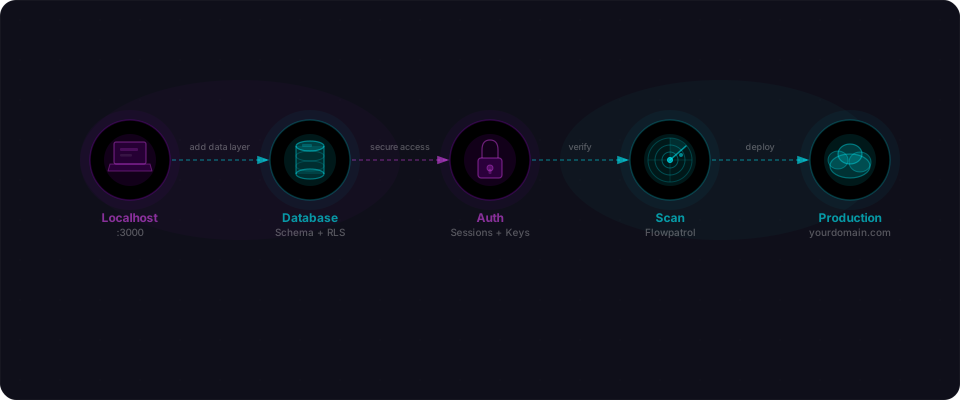
Your AI built a working prototype. Now make it survive real users. Database, auth, environment, hosting — every step from demo to production-ready.
0/15
complete
Section 01
Database
Throwaway storage is the #1 killer of prototype-stage apps — your data disappears on every deploy. This section moves you onto a real database.
0/3
complete
- 01
Migrate to a hosted database
Critical15 minVercel, Railway, and Render wipe your app's filesystem on every deploy. If your data lives in a local file (SQLite, a JSON blob, anything on disk), it vanishes. Move to a hosted Postgres: Supabase is the easiest path for most builders, Neon and PlanetScale are solid alternatives.
- 02
Use a pooled connection string
High5 minEvery request opens a connection to the database. Without pooling (which reuses connections), you'll run out around 10-20 concurrent users and your app will start rejecting traffic. Supabase and Neon both provide a pooled endpoint — point your `DATABASE_URL` at it.
- 03
Set up automated backups
Medium5 minSupabase Pro includes daily backups out of the box, and Neon handles backups automatically too. On the free tier, dump your database weekly with the command below — or wire it up as a scheduled GitHub Action so it runs without you thinking about it.
Section 02
Authentication
A login page is not real security. Production auth means verified emails, secure passwords, and password resets that actually work.
0/3
complete
- 04
Use a proper auth provider
Critical20 minDon't let AI hand-roll your auth system — it gets the security details wrong. Use a proven provider: Supabase Auth (free, pairs perfectly with Supabase), Clerk (polished UI, fastest setup), or Auth.js (open source, the default for Next.js). They handle password hashing, sessions, email verification, and password resets correctly so you don't have to.
- 05
Enable email verification
High2 minWithout email confirmation, bots will flood you with fake accounts within hours of launch. Turn it on in your auth provider settings. For Supabase: Dashboard → Authentication → Settings → Enable email confirmations.
- 06
Test the password reset flow end-to-end
High5 minSign up with a real inbox. Request a password reset. Click the link, pick a new password, and log back in with it. If anything breaks along the way, fix it before launch — someone will need this on day one.
Section 03
Environment & secrets
The .env file your AI generated is a liability. Some values are safe to ship to the browser, some must stay server-side, and none of them belong in git.
0/4
complete
- 07
Audit every environment variable
Critical5 minOpen your .env file. For each variable, decide whether it's safe to ship in your client bundle or whether it has to stay server-side. Client-safe: publishable keys, Supabase URL and anon key. Server-only: service role keys, database URLs, webhook secrets, and any key that spends money.
- 08
Keep .env out of git
Critical2 minYour .env file holds secrets. It has no business in version control. Check your git history: if .env was ever committed, rotate every secret in it — even if you deleted the file later. Git remembers everything, and public repos are scraped within minutes.
- 09
Push env vars to your hosting platform
High5 minA local .env is not enough. Set every server-side variable in your hosting dashboard so your deployed app actually has them. Vercel → Settings → Environment Variables. Railway → Variables. Render → Environment.
- 10
Cap spending on every paid API
Medium3 minIf your app touches OpenAI, Anthropic, Resend, or any pay-per-use API, set a hard spending cap before launch. A runaway bug or an abusive user can turn into a four-figure bill overnight. Start with $20-50 while you find out what real usage looks like.
Section 04
Hosting & deployment
Your app runs on localhost. It needs to run on a URL that doesn't end in :3000.
0/3
complete
- 11
Pick a host and deploy
Critical10 minFor Next.js: Vercel is the path of least resistance, with Netlify and Railway close behind. For plain React or Vite: Vercel, Netlify, or Cloudflare Pages. Connect your GitHub repo, set your environment variables, and the first deploy is minutes away.
- 12
Enable preview deployments
Medium2 minVercel and Netlify spin up a unique preview URL for every pull request. Use them. Test changes on the preview URL before they ever touch production — it catches regressions that localhost misses. Free on every major platform.
- 13
Add a health check endpoint
Medium3 minA tiny `/api/health` route that confirms your app can reach the database. Uptime monitors (next section) ping this endpoint every minute so you find out your app is down before your users do.
Section 05
Monitoring & errors
You can't fix what you can't see. Set up error tracking and basic analytics before your first user hits a bug.
0/2
complete
- 14
Wire up error tracking
High10 minUsers don't file bug reports — they leave. Sentry catches every crash in your app, server and client, and pings you with a stack trace detailed enough to actually fix the bug. Its free tier is more than enough for most early-stage apps.
- 15
Add product analytics
Medium5 minYou need to know whether anyone is actually using the thing you built. Pick one: PostHog (free, open source, feature-rich), Plausible (lightweight and privacy-first), or Vercel Analytics (zero setup if you're already on Vercel).
Database
Throwaway storage is the #1 killer of prototype-stage apps — your data disappears on every deploy. This section moves you onto a real database.
Migrate to a hosted database
Vercel, Railway, and Render wipe your app's filesystem on every deploy. If your data lives in a local file (SQLite, a JSON blob, anything on disk), it vanishes. Move to a hosted Postgres: Supabase is the easiest path for most builders, Neon and PlanetScale are solid alternatives.
Users create accounts. They come back tomorrow. Their data is gone. This is the single most common "my app broke in production" failure for AI-built projects.
Use a pooled connection string
Every request opens a connection to the database. Without pooling (which reuses connections), you'll run out around 10-20 concurrent users and your app will start rejecting traffic. Supabase and Neon both provide a pooled endpoint — point your `DATABASE_URL` at it.
# Supabase: use the pooler URL (port 6543), not the direct URL (port 5432).
DATABASE_URL="postgresql://postgres.[ref]:[password]@aws-0-[region].pooler.supabase.com:6543/postgres"

# Neon: the default connection string they give you is already pooled.
DATABASE_URL="postgresql://user:pass@ep-cool-name-123.us-east-2.aws.neon.tech/neondb?sslmode=require"
Set up automated backups
Supabase Pro includes daily backups out of the box, and Neon handles backups automatically too. On the free tier, dump your database weekly with the command below — or wire it up as a scheduled GitHub Action so it runs without you thinking about it.
# Export your entire database to a backup file (run weekly)
pg_dump $DATABASE_URL --format=custom --file=backup-$(date +%F).dump

# Restore from a backup if something goes wrong:
pg_restore --dbname=$DATABASE_URL backup-2026-04-10.dump
Authentication
A login page is not real security. Production auth means verified emails, secure passwords, and password resets that actually work.
Use a proper auth provider
Don't let AI hand-roll your auth system — it gets the security details wrong. Use a proven provider: Supabase Auth (free, pairs perfectly with Supabase), Clerk (polished UI, fastest setup), or Auth.js (open source, the default for Next.js). They handle password hashing, sessions, email verification, and password resets correctly so you don't have to.
Custom auth is where most production security bugs live. AI-generated auth routinely stores passwords in plaintext, issues guessable session tokens, or skips email verification entirely.
Enable email verification
Without email confirmation, bots will flood you with fake accounts within hours of launch. Turn it on in your auth provider settings. For Supabase: Dashboard → Authentication → Settings → Enable email confirmations.
Done with the guide?
A checklist tells you what to do. A scan proves you did it. Paste your URL and verify everything in minutes.